Updated:October 19, 2026

12 min
12 min

Before you proceed with any binary options broker, it is necessary to check the deposit and withdrawal limits, methods, and options. If a broker makes it difficult to withdraw funds, it's pointless to open an account. However, if you have your eyes set on Olymp Trade, deposits and withdrawals should be no concerns at all.

Author

You cannot jump straight to the withdrawals. You need to have an account first. Here is how to set it up:
Head over to the Olymp Trade website and hit "registration" if you do not already have an account. The registration form requires you to fill out your email ID and a strong password. After the email verification, your account should be up and running. The next step takes you to the training, which I recommend you do not skip. Once you are inside, you can view the dashboard. You can locate the profile icon in the left corner of the page. Against the profile icon, you will find the Payments tab for initiating deposits and withdrawals.
Sign up for Olymp Trade right now!
Before you can even think of withdrawals, it is important to make a quick deposit. But first, you need to choose an account type. While Olymp Trade lets you have your geographical preference regarding account creation – an INR account for me, you can select other currencies like Euro, USD, and USDT to transact.
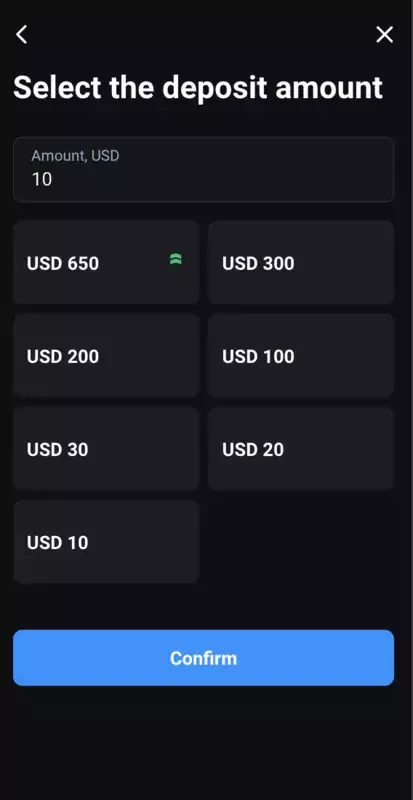
Deposit threshold for the USD account
The currency you choose determines your deposit threshold.
For USD, you can start with a minimum deposit of $10. As for the methods, you can choose between:
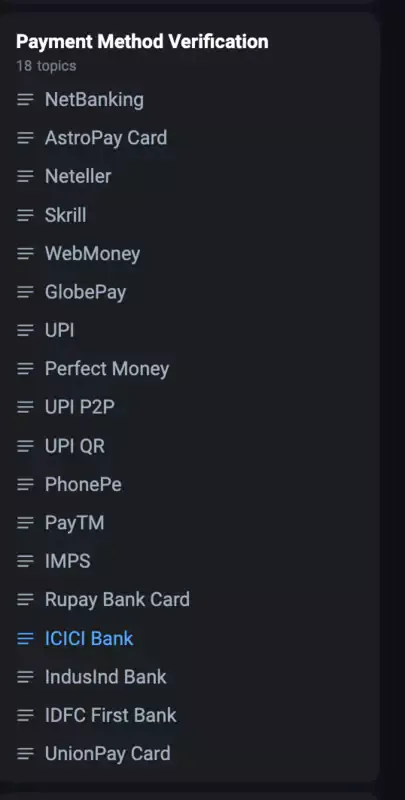
Existing payment methods: Deposits and withdrawals included
Please note that withdrawals follow the same pathway or set of avenues. The minimum withdrawal sum is $10.
All the browser-specific deposit and withdrawal options hold, even for the Olymp Trade mobile and desktop apps.
Create an account on Olymp Trade and make your first deposit. A full breakdown of methods and minimums, side by side, is further down this page.
Unlike other Binary Options brokers, Olymp Trade doesn't require you to verify KYC credentials initially. Yes, you heard that right!
You can make deposits without requiring any verification. However, when you forward a withdrawal request, you must provide the necessary details to the platform.
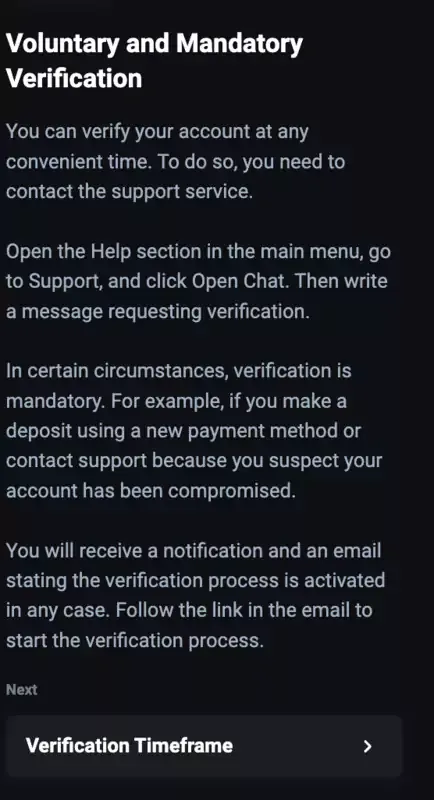
Profile verification: Best Practices
You can even opt for voluntary verification by connecting with the customer support team beforehand. But in some cases, if you abruptly change your deposit method, Olymp Trade's support team might assume an account compromise and ask for a mandatory verification even at the deposit phase.
As for the credentials, you must keep the national ID or any relevant government-registered ID handy. For address verification, you can submit the utility bills. If you're still deciding whether Olymp Trade is worth this step at all, our overview of what Olymp Trade is and how it works covers the basics first.
Create an Olymp Trade account first and then get to verification.

Withdrawals on Olymp Trade is no rocket science. The process is as simple as it gets. Here are the steps:
Note that Olymp Trade doesn't charge any fee for withdrawals. However, you need to pay the network fee for crypto withdrawals.
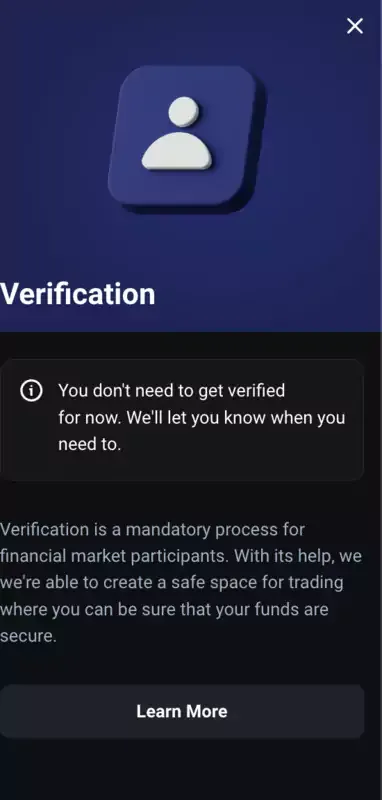
Olymp Trade doesn't ask for instant verification.
I have been using Olymp Trade for quite some time now, so here is a secret strategy I found. As I mentioned, you can choose any currency account to work with. You can also have multiple currency accounts, depending on the regions you frequent and the fiat choices you deal with.
While withdrawing, you can transfer directly from one account to another on Olymp Trade without paying any currency conversion fee. For instance, if you want to convert 1 INR to USD, Olymp Trade charges a standard global rate of 0.01198, the mid-market rate as of May 15, 2024. If you're after a different kind of edge instead, our guide to risk-free trades on Olymp Trade covers a strategy angle rather than a transfer one.
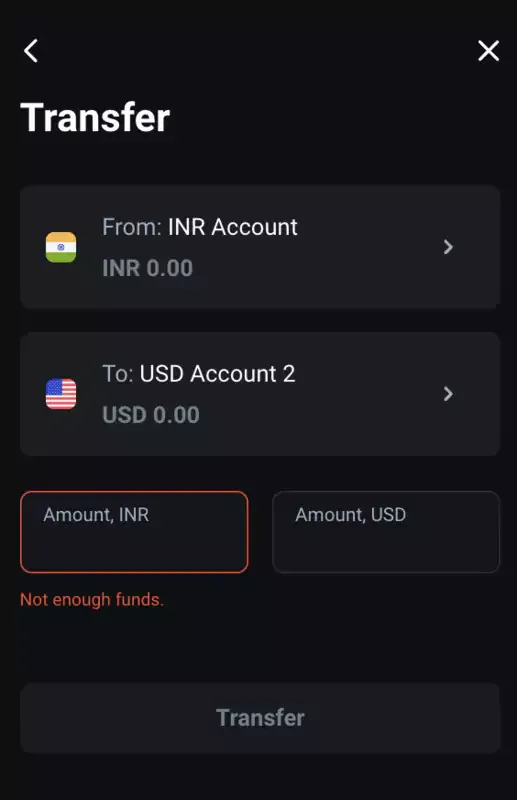
The transfer function to move funds from one account to the other
Sign up for Olymp Trade right now!
Now that you focus on withdrawals, you must know a few things upfront.
The minimum withdrawal limit is $10, but there is no ceiling, and you can withdraw as much as you want. The timeframes can vary, with crypto withdrawals taking anywhere between a few hours and a day. Bank transfers can take over four days, whereas card-based withdrawals can take between one and five days. E-wallets never take longer than 24 hours.
I tested a $50 withdrawal via Skrill, and it took 12 hours for the funds to reflect.
Another aspect of withdrawals from Olymp Trade involves support for regional withdrawal methods. For instance, if you are in India, you can use UPI, and Kenyan folks can use Mpesa.
You can access the deposit and withdrawal requests in the "Transactions" section under Payments. Note that you must choose the date filter correctly, or the data will not appear. If you're withdrawing everything because you're closing your account rather than continuing to trade, our guide to deleting an Olymp Trade account covers what happens to any remaining balance.
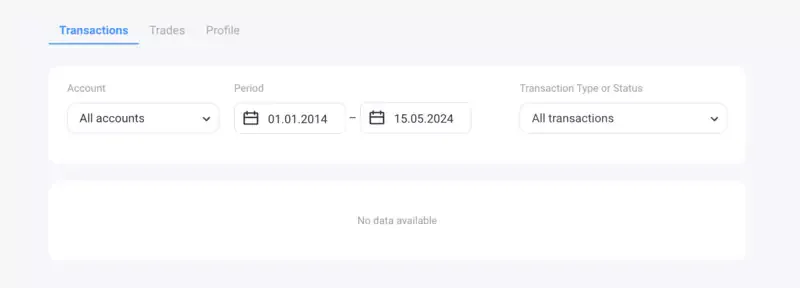
Withdrawal dashboard
Have you been using other brokers? If yes, here is a quick comparison of Olymp Trade's withdrawal mechanism with the likes of IQ Option and Binomo.
| Feature | Olymp Trade | IQ Option | Binomo |
| Minimum Withdrawal | $10 | $2 | $10 |
| Maximum Withdrawal | No limit | $1,000,000 / transaction | Varies by account type |
| Withdrawal Fees | None | None | None |
| Processing Time | 1-5 business days for cards, within 24 hours for e-wallets, 3–5 days for bank transfers, up to 24 hours for cryptocurrencies | 1-5 business days for cards, within 24 hours for e-wallets, 3-7 business days for bank transfers | 3-5 business days |
| Verification Required | Yes | Yes, for withdrawals | Yes, for withdrawals |
| User Experience | Generally positive; users like the quick processing for e-wallets and good customer support | Positive: quick e-wallet withdrawals, but bank transfers are slow. | Mixed; some users report delays and issues with customer support. |
Quotex, if you're weighing that platform too, matches Olymp Trade's $10 minimum withdrawal; see our full guide to withdrawing money on Quotex for its fee and timing details side by side.
Liked Olymp Trade's offering the most! Create an account and get to trading right away.
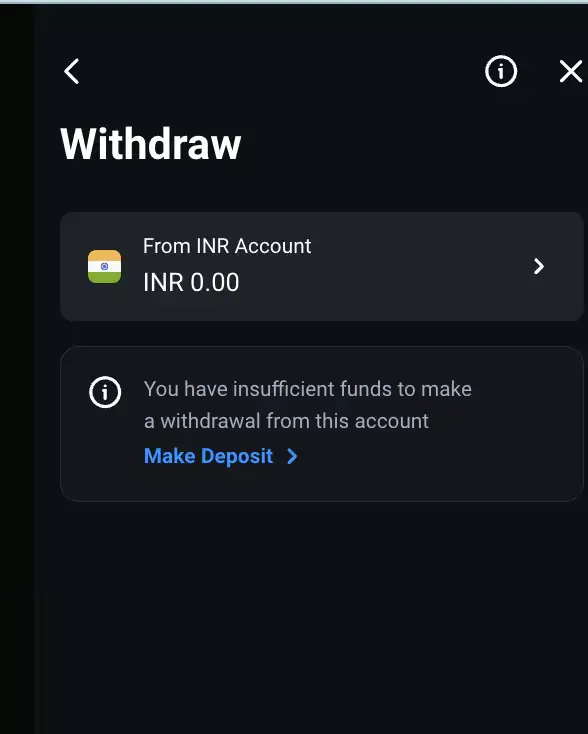
The flexibility to withdraw from any account of choice
Online systems can act up anytime. And Olymp Trade is no different. In case your primary focus is withdrawals, here are the issues you can expect, along with the possible solutions:
If your withdrawal requests aren't going through, you might want to email the customer support team. If not already, this email should have all your KYC credentials to verify the account. You can easily check the status of your verification in the settings section.
If you plan on withdrawing using a method not initially used for making a deposit, you might experience an error. To avoid the same, stick to the withdrawal method that otherwise aligns with the deposits. For instance, if you used Skrill for the deposit, withdraw funds similarly.
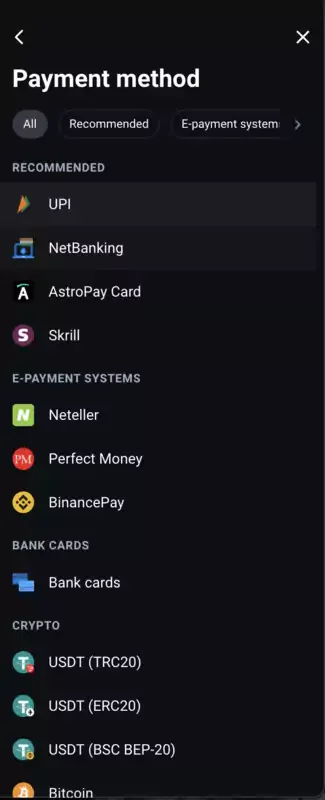
Ensure that withdrawal methods align with the deposit methods
You might notice that certain payment processors prevent you from making a withdrawal. Just glance at your account balance and see if it is under $10. Fix this honest mistake by making a quick, winning trade.
There are times when the payment processor of choice simply acts up. As you have already matched it with the deposit method, the only way around it is to contact the bank or the wallet provider to get a resolution.
It is possible for Olymp Trade's system to encounter errors occasionally, or it could be a server issue on your end. While patience is the only fix, you can try a different browser, consider disconnecting the VPN if it is in use, or even clear browser cookies and cache to speed up the process.
If you aren't active even once every 180 days, Olymp Trade will charge a $10 fee. This might lower the account balance. Therefore, ensure that you keep making trades occasionally to avoid additional overheads.
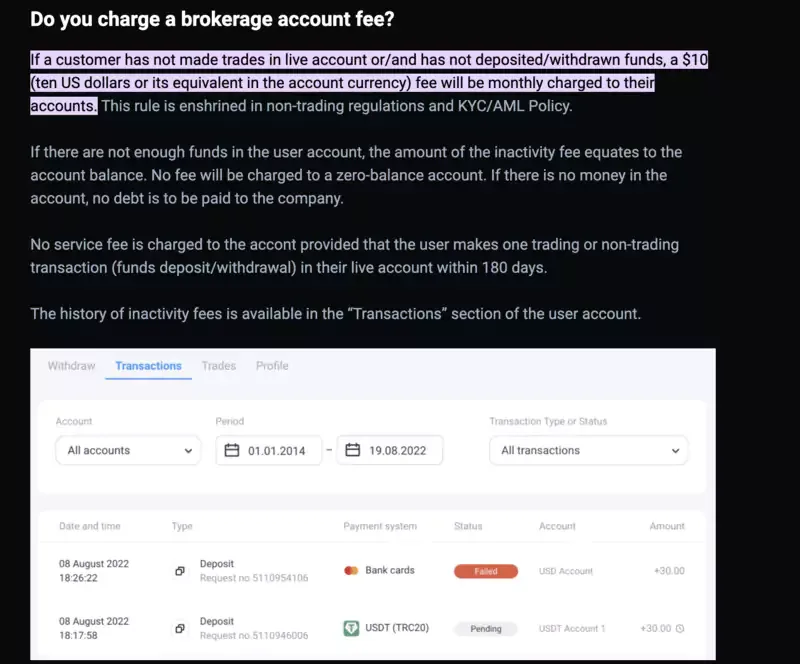
The inactivity fee can eat into your account balance.
If none of the solutions help, you can always contact the customer support team, who will resolve each issue quickly. For a broader read on whether Olymp Trade is worth the trust generally, our related guide to Olymp Trade covers regulation and reputation in more depth.
Every method covers the same $10 minimum, and Olymp Trade doesn't charge a withdrawal fee on any of them, but timing and any third-party costs vary enough to matter if you're planning around a specific date.
| Method | Processing Time | Fees |
| Crypto (Bitcoin, Ether, USDT) | A few hours up to 24 hours | Network fee only, set by the blockchain, not Olymp Trade |
| Bank Cards | 1 to 5 business days | None from Olymp Trade; your bank may add its own |
| E-Payment services (Skrill, Neteller) | Under 24 hours | None |
| Bank Transfer | Over 4 business days | None from Olymp Trade; some banks charge a receiving fee |
| Regional methods (UPI, Mpesa) | Varies by provider, typically under 24 hours | Depends on the local provider |
Crypto is fastest if your deposit was also crypto, since Olymp Trade requires matching methods. Bank transfer is slowest, a poor choice if you need funds this week.
Here's the full withdrawal flow from your dashboard, not just the four steps covered earlier.
Log into your Olymp Trade account and click the profile icon in the top left corner, then select the Payments tab. Choose Withdraw rather than Deposit; the two share a menu but lead to separate forms.
Pick the same payment method you used to deposit. Olymp Trade rejects withdrawal requests through a different method the first time, which is the single most common reason a request stalls before it even reaches processing.
Enter the amount, keeping it at or above the $10 minimum, and confirm the currency matches your account type. Submit the request, and if this is your first withdrawal, expect a verification prompt asking for a government ID and a recent utility bill or bank statement for address confirmation.
Once approved, funds move on the timeline for your chosen method. You can track the request under Transactions, filtered by the correct date range, since the wrong filter is the most common reason a completed withdrawal looks like it's missing.
Quick reference for the issues that come up most, beyond the full troubleshooting walkthrough above.
Wrong method selected: withdrawal rejected outright. Fix: resubmit using the exact method you deposited with.
Balance under $10: withdrawal button greyed out or blocked. Fix: place one more trade to clear the threshold, or wait for an open position to close.
First-time withdrawal, no prior verification: request sits pending. Fix: submit ID and address proof as soon as the prompt appears, rather than waiting.
Crypto withdrawal delayed past 24 hours: usually a network congestion issue, not Olymp Trade. Fix: check the transaction hash on the relevant blockchain explorer before contacting support.
180 days without activity: $10 inactivity fee applied automatically. Fix: place at least one trade every few months if you're not withdrawing regularly.
If none of these match what you're seeing, support resolves most remaining cases within a day.
I had the opportunity to try out multiple Binary Options brokers. However, I feel Olymp Trade is one of the most accommodating, especially regarding the withdrawal options, a manageable threshold, and a more balanced stance towards verifications.
If the $10 minimum withdrawal fits your budget, opening an account takes a few minutes, and the Payments tab is the one covered above. Check the FAQ below for details we haven't walked through yet, including exact processing windows and what to do if a withdrawal gets stuck.
FAQ
It's $10, regardless of currency account or withdrawal method. There's no maximum, so you can withdraw any amount above that floor.
You withdraw through the same method you used to deposit, request at least $10, and Olymp Trade processes it without charging a fee, though crypto withdrawals carry a network fee outside Olymp Trade's control.
Based on the withdrawal process specifically, yes: no withdrawal fees, clear minimums, and verification that only kicks in when you actually request funds rather than upfront.
$10 minimum for both deposits and withdrawals. No withdrawal fee from Olymp Trade itself; the only cost you'll see is a blockchain network fee on crypto withdrawals.
E-wallets and regional methods like UPI or Mpesa: usually under 24 hours. Crypto: a few hours to a day. Cards: 1 to 5 business days. Bank transfer: over 4 business days, the slowest option.
Find Your Perfect Broker: Explore Our List Now!
Choose the best with our expert-selected options


Find Your Perfect Broker: Explore Our List Now!
Choose the best with our expert-selected options
Discover top binary options brokers tailored to your region. Browse our curated lists by country:
13733