Updated:October 22, 2026

8 min
8 min

To use a Binary Options broker, you need to fund it. This theory holds even for Olymp Trade, one of the easy-to-use brokers. If you are unaware of how Olymp Trade works, it offers a handful of tradable instruments — forex, commodities, Forex pairs, crypto assets, stocks, and more. Depending on your trading preferences, these instruments are available as Binary Options and even CFDs. Many people wonder how to deposit or fund their account in Olymp Trade despite the enticing list of options. Today, I plan to guide you through some more elemental processes associated with Olymp Trade, including deposits.

Author
You cannot just go and put money in your Olymp Trade account. You must set up the account first, which can be tricky if done differently. Here are the steps leading to that:
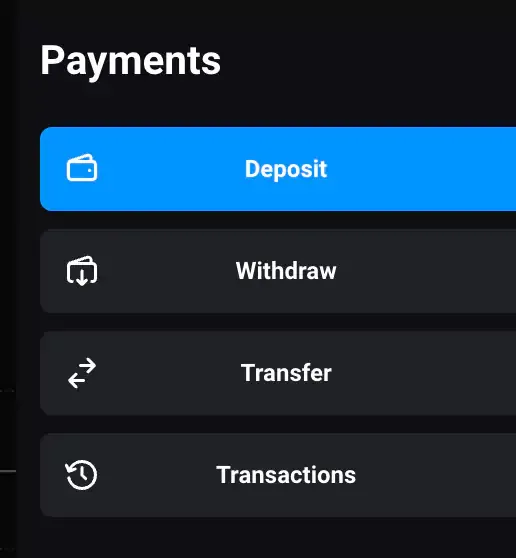
Deposit under the “Payments” tab
Here are the choices I was given:
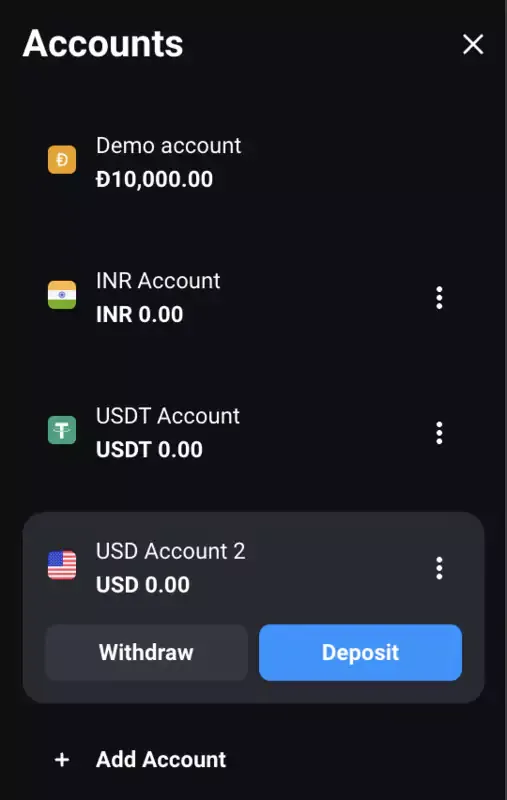
Different account types on offer
You can load up any account you choose using the correct deposit methods.
Create an account first and make your first deposit.
Try the Olymp Trade demo before funding a live account.
Depending on the account currency you choose, there are quite a few deposit methods available:
Olymp Trade brings forth a wide range of crypto-specific payment methods. This platform even accepts meme coins like SHIB and DOGE, which differs from most other brokers.
Olymp Trade recommends the best and easiest deposit options based on your location.
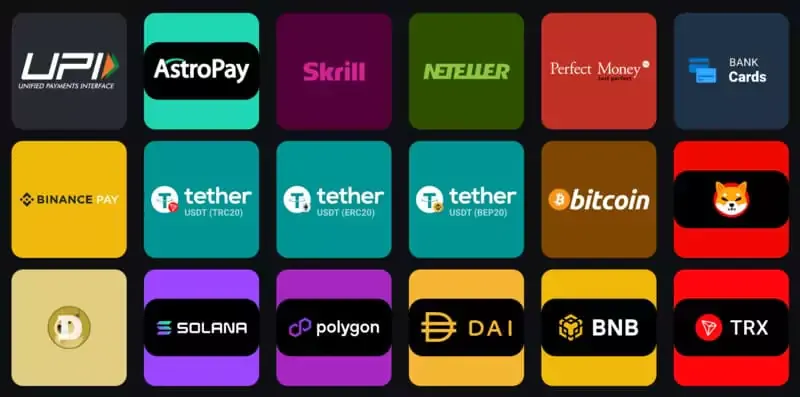
Every deposit method listed
In some cases, Olymp Trade might offer several local payment options, including UPI, for Indian users.
Sign up for Olymp Trade and test out multiple deposit methods.
The minimum deposit in Olymp Trade can vary by currency and payment method.
You can choose any method you prefer. I tested all of them, and here are my findings:
Nothing beats the ease of bank cards. You can take them out, fill in the details, or save them for future transactions. E-wallets are useful as you can park funds in them and use instant deposits.
Olymp Trade doesn’t charge any fee for deposits. Yet, this holds if you do not use third-party processors and e-wallets like Skrill. Skrill charges 1%, which might set you back if you fund a significant amount. Even for crypto deposits, you need to pay the network fees.
This is why, for USDT deposits, you should consider the TRC-20 network, as ERC-20 transfers might burn a hole in your pocket.
Skrill and Neteller are the fastest, followed by crypto transfers. Bank cards might not work well if speed is your priority.
Also, most transactions will go through quickly if you use the same method for deposits and withdrawals.
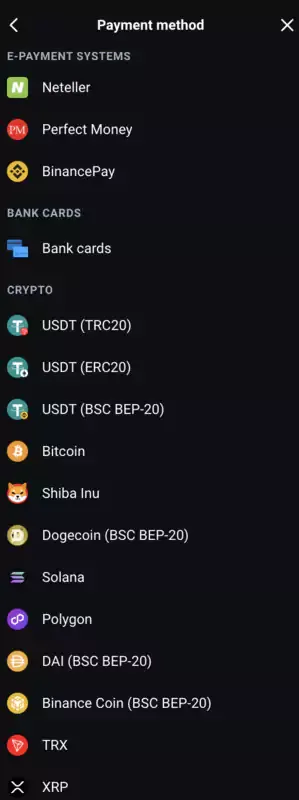
Choosing from the available deposit methods
Create an account and make your first deposit using the method of choice!
Where possible, use the same payment route for deposits and withdrawals.
Discussing the Key Numbers
Besides the deposit steps and methods, quite a few other elements, number-specific, can determine your deposit-specific proclivities.
Here is a quick snapshot to refer to:
As you can see, Olymp Trade lets you choose the deposit amount. While I opted for the lowest or the 700 INR amount, courtesy of my testing-specific needs, you can go as high as 50,000 INR. Depositing this sum automatically gives you the Advanced account status.
Note that the INR account type doesn’t have the deposit-led Expert account selection feature. You can get that for USDT deposits, though. While the minimum deposit amount is still $10 or 10 USD, you can go as high as 2,000 or 5,000 USDT to get the Expert rights. Holding an expert account gives you access to risk-free trades.
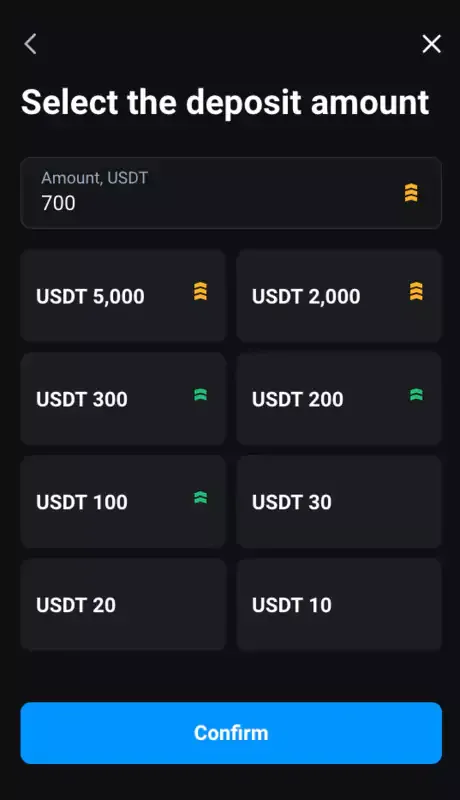
Green and Yellow arrows highlighting advanced and expert accounts
Olymp Trade has maximum and minimum deposit thresholds based on your account type. For instance, if you use a USD account, the maximum limit is $650. For a EUR-based account, the upper threshold is $600.
Here are the steps you need to follow to make a deposit specifically:
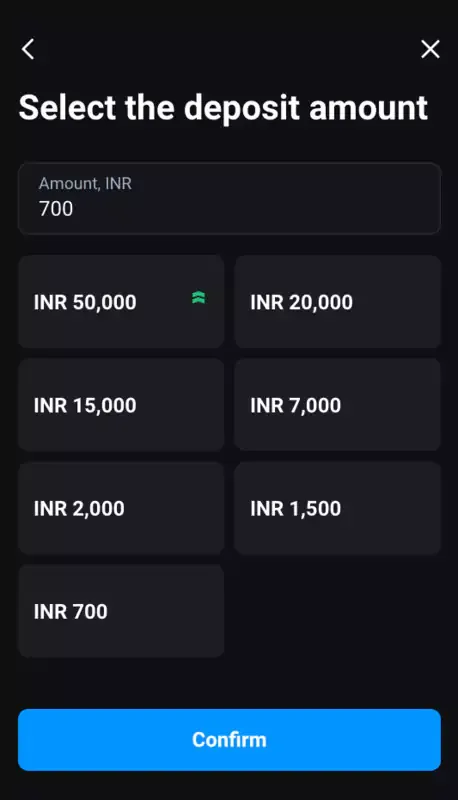
Choosing the amount before proceeding
Create an account first, and then follow the steps I mentioned.
Before confirming, recheck the account currency and payment details.
As mentioned, deposits are key to trading Binary Options on Olymp Trade. While methods and choices are all acceptable, it is always advisable to activate security strategies like two-factor authentication before proceeding. Furthermore, getting KYC-verified before making a sizable deposit is advisable if you are a regular trader.
For your first deposit in 2026, start with the minimum available amount and check any fee shown by the payment provider. A small first transfer also lets you confirm that the method works before you fund the account with more money. The FAQ below covers minimums, fees, timing, and basic safety points.
Keep payment details consistent so later withdrawals are easier to process.
The minimum deposit in Olymp Trade can vary by account currency and by the payment options available in your region. The article currently lists $10 for a USD account and gives 700 INR as an example for an INR account.
| Method | What to check | Possible extra cost |
| Bank card | Card limits and bank approval | Bank or conversion fee |
| E-wallet | Supported account currency | Provider fee |
| Crypto | Coin and network | Network fee |
| Local payment | Availability in your country | Provider fee |
Olymp Trade is described here as not charging a deposit fee. A bank, wallet, or crypto network may still charge its own fee, so review the final payment screen before you confirm.
Log in and open Payments, then choose Deposit. Select the account you want to fund and check its currency before entering an amount. The payment screen should show the available minimum and maximum for the method you choose.
Next, select a bank card, e-wallet, crypto transfer, or local payment option. Enter the requested details carefully. For cards, check the number, expiry date, and CVV. For crypto, verify both the wallet address and network.
Review the payment summary and confirm it. Complete any two-factor authentication step if it appears. Once the transaction is submitted, wait for the account balance to update and keep the receipt or transaction reference until the funds are credited.
If a deposit fails, first check whether the amount meets the minimum for the selected method. Then confirm that your card, wallet, or payment account supports the account currency.
For a declined card, check the available balance and whether the bank blocks online or international transactions. With crypto, verify the network before sending funds because a wrong network can make recovery difficult.
If money leaves your bank or wallet but does not appear in Olymp Trade, do not repeat the payment straight away. Save the transaction ID, amount, and time, then contact support. The Olymp Trade review also covers the platform's main account conditions.
It is the smallest amount you can add to a live account. It can vary by currency and payment method.
Select an account and payment method. The platform then shows the applicable minimum.
Use the official site, enable two-factor authentication, and complete verification. Trading still carries risk.
This article lists $10 for USD accounts. Other currencies may differ, and provider fees can apply.
Timing depends on the method. E-wallets and some crypto transfers may be faster than cards or bank processing.
Find Your Perfect Broker: Explore Our List Now!
Choose the best with our expert-selected options


Find Your Perfect Broker: Explore Our List Now!
Choose the best with our expert-selected options
Discover top binary options brokers tailored to your region. Browse our curated lists by country:
3751