Updated:November 25, 2026

8 min

0
Do you need a forex VPS? Uses, providers and setup
A VPS can keep an Expert Advisor running after your laptop closes. It also needs monitoring, secure access and a plan for restarts. Compare native MetaTrader hosting with a Windows server before paying for resources you do not need.

Mikhail Vishnyakov
Author

Your laptop sleeps at midnight. The broker may still hold an accepted protective order, but an Expert Advisor that was supposed to trail the stop can no longer calculate its next adjustment. Server-held orders and terminal-side logic have different operating requirements.
A forex VPS can host that terminal-side work on a remote machine. The useful question is what must keep running, where it should run and how you will know when it stops doing the intended job.
What a forex VPS is and when you need one
A virtual private server provides a remote computing environment. In forex VPS hosting, that environment commonly runs a trading terminal, Expert Advisors or copying software. You connect to configure and inspect it while the server continues operating independently of your laptop.
If you place occasional manual trades and the broker holds every required order, a separate server may add little. If an EA must react to incoming ticks or a copier needs a continuous terminal connection, uptime becomes part of the strategy's implementation.
The MetaTrader virtual-hosting guide describes a specialised hosted trading environment. A general Windows VPS is a different service with a desktop operating system and broader administration responsibilities. Match the environment to the software you actually need.
VPS for expert advisors and algo trading
List every component: terminal, EA version, indicators, external libraries, data connection and account server. An EA that depends on a DLL or another desktop application needs an environment supporting those dependencies. A specialised service can impose restrictions.
MetaTrader's migration documentation explains transferring the active trading environment and prohibits DLL calls on its native virtual platform. Check that restriction before assuming an EA will run unchanged. A standard Windows server has its own permissions and security requirements.
Define what happens after a restart. If the strategy finds an existing open position, it should recognise that state before sending a fresh entry. Keep a unique strategy identifier and inspect order handling so a reconnection cannot silently create duplicate exposure.
Also define supervision. A connected terminal can still have an EA disabled, a missing symbol or an invalid account session. A useful health check verifies the expected strategy activity and logs, as well as whether the machine responds.
What to look for: location, latency, RAM and uptime
Choose the location using the broker's actual trade server, not the address of its head office. Measure the relevant connection from the proposed host. A server in the same city can still use a different network route or data centre.
Latency is only part of execution. Moving a terminal closer can shorten some communication delays, while the broker, market depth and matching process still determine the available fill. A low ping cannot guarantee a stop price through a market gap.
Resource needs depend on workload. As a test configuration, one terminal with a small EA might begin on two virtual CPUs and 4 GB RAM, then be monitored for memory, CPU use and delayed processing. This is an illustrative starting point, not a universal requirement for every program.
Translate an uptime claim into minutes. In a 30-day month, 99.9% availability permits about 43.2 minutes of downtime under a simple calendar calculation. At 99.99%, the corresponding figure is 4.32 minutes. Read the service-level agreement's measurement and exclusions.
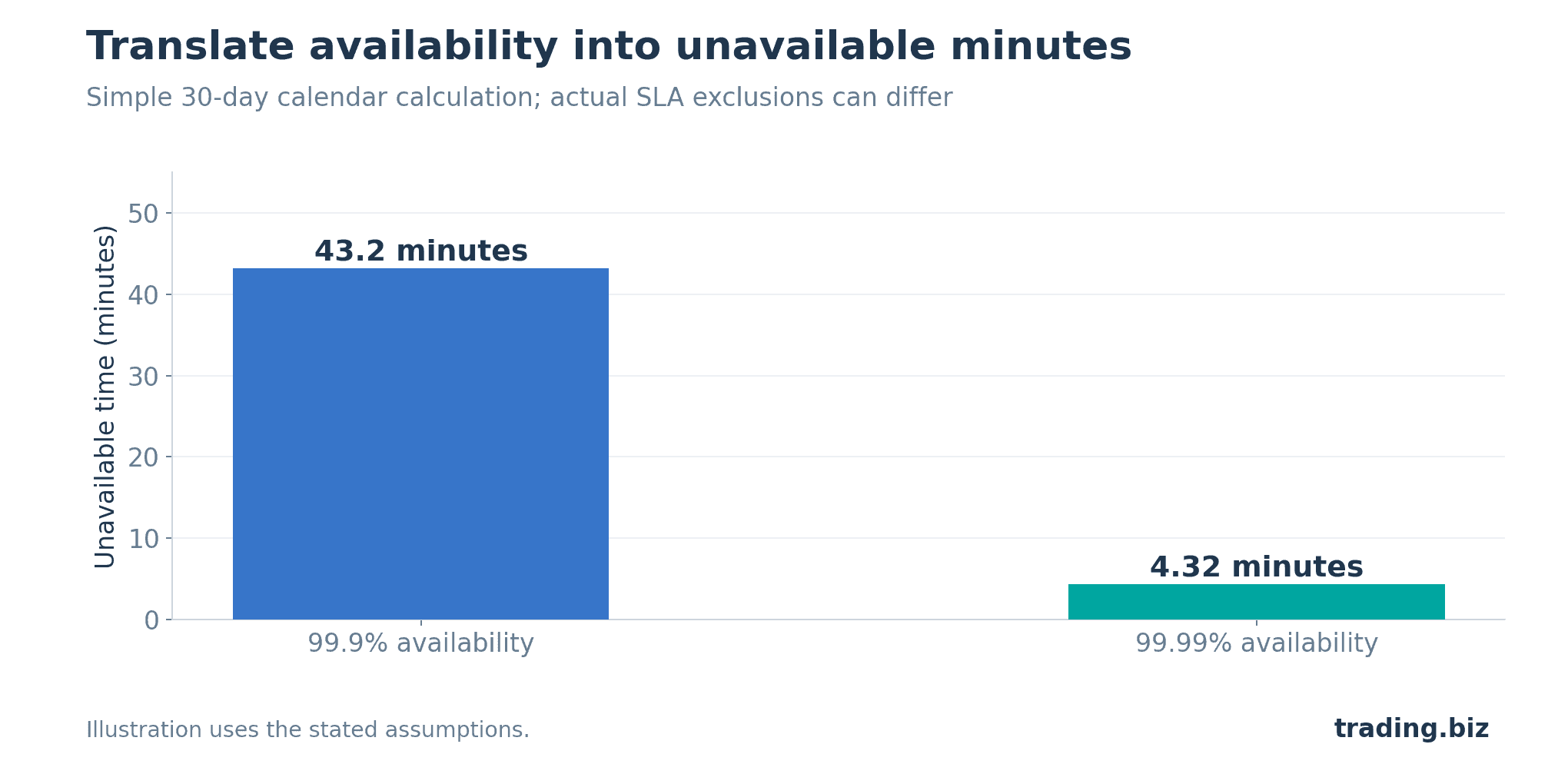
Figure 1. Over 30 days, 99.9% and 99.99% availability correspond to approximately 43.2 and 4.32 minutes unavailable under a simple calendar calculation. A provider's SLA can use different exclusions.
Storage, update procedures and backup also matter. Logs can grow, and an operating-system restart can interrupt the terminal. Keep the configuration and EA inputs reproducible so recovery does not depend on remembering the settings after a failure.
Forex VPS provider options: broker-provided and independent
Compare the operating models before comparing headline prices. Each places a different amount of configuration, software compatibility and account dependence on you.
| Option | What it provides | What to verify |
|---|---|---|
| Native MetaTrader hosting | Migration of a specialised terminal environment | EA compatibility, restrictions and synchronisation |
| Broker-sponsored hosting | Hosting tied to a brokerage offer | Eligibility, activity thresholds and loss of subsidy |
| Independent Windows VPS | Remote desktop and general software environment | Licence, resources, access security and maintenance |
For a broker example, IC's VPS terms describe conditional access associated with its live accounts. Read the exact entity's current conditions. An offer linked to trading activity can become paid when the required activity stops.
An independent forex VPS provider may offer greater flexibility for several terminals or additional tools. That flexibility also leaves you responsible for operating-system configuration and compatibility. Compare the complete bill, including a Windows licence, backups and any extra support.
Searches for cheap forex VPS hosting or best VPS for forex MT4 should begin with the workload and account location. A cheaper distant machine can be adequate for one slow strategy and unsuitable for a different timing requirement.
How to set up MetaTrader on a VPS step by step
First, record the account server and the tested EA configuration. Keep an authorised copy of the program and the input file. Confirm that the selected host supports the required platform and dependencies before starting migration.
For a Windows VPS, use the provider's verified remote-access process, update the operating system and obtain the terminal from a trusted official route. Log into the correct account and broker server. Check the symbol names and contract settings against the tested environment.
Load the EA on the required charts, apply the saved inputs and verify permissions. Inspect the journal for connection, trading and dependency errors. Run a limited test that can demonstrate the intended sequence without taking unnecessary live exposure.
For native MetaTrader hosting, prepare the local charts and programs and migrate the intended environment through the platform's VPS controls. Inspect the hosted logs after synchronisation. Check which instance is responsible for trading before leaving a local terminal running the same strategy.
Finally, test reconnection and recovery. Confirm that restarting the host restores the intended process and recognises existing positions. Disconnecting a remote desktop session is different from stopping the server; verify the provider's behaviour instead of assuming either action.
Costs, free VPS conditions and security
A hypothetical $20 monthly bill is $240 per year if unchanged. On a $1,000 test allocation, that is 24% of the starting capital before trading costs. The fixed expense needs to be included when evaluating a small automated account.
A free VPS from broker offer can require a qualifying balance, trading volume or other activity. Do not generate uneconomic trades simply to retain a hosting subsidy. Compare the avoided hosting bill with the extra spreads and commissions.
Protect remote access and limit permissions. Microsoft's guidance on RDP exposure explains the risk of exposing Remote Desktop directly to the public internet and describes controlled access options. Use the host's supported secure configuration and authentication controls.
Keep credentials out of shared screenshots and support messages. Back up configuration without unnecessarily distributing account secrets. A forex VPS trial should test recovery and supervision as well as raw connection speed.
Set a response for a missed health check. A practical test might notify you when the terminal has no expected heartbeat for five minutes, while recognising that a quiet market can legitimately produce fewer ticks. The check should distinguish connection status from strategy activity. Test the notification route before leaving the process unattended and document who can stop the program if remote access fails.
Terms used when choosing hosting
These definitions describe different parts of the service. Match them to the provider's contract and your measured workload before comparing two offers.
| Term | Meaning |
|---|---|
| VPS | Remote virtual computing environment |
| Latency | Elapsed time through a connection or processing stage |
| Uptime | Availability measured under a stated definition |
| Migration | Transfer of the intended trading environment to hosting |
| Health check | Verification that the expected process is operating |
FAQ
Do all forex traders need a VPS?
The need follows the process. A continuously operating EA has different requirements from occasional manual entries with server-held orders. Identify the component that must remain running first.
Does more RAM improve every trading result?
Additional memory helps when the workload needs it. It cannot create a trading edge or guarantee a fill. Measure resource pressure before paying for a larger configuration.
Can I turn off my laptop after setup?
After verifying that the required process is running on the remote environment, the laptop need not host that process. Keep a separate method for monitoring and regaining access.
What should I verify before ending a trial?
Check logs, duplicate-order prevention, restart behaviour, secure access and the full monthly cost. Keep the configuration and recovery procedure ready before committing to a longer subscription.
Find Your Perfect Broker: Explore Our List Now!
Choose the best with our expert-selected options
Find Your Perfect Broker: Explore Our List Now!
Choose the best with our expert-selected options
Discover top binary options brokers tailored to your region. Browse our curated lists by country: