Updated:November 13, 2026

8 min

2
MetaTrader 5 guide for beginners: install, connect, indicators
MetaTrader 5 is a trading platform used to connect with participating brokers. It handles charts, orders, price alerts and automated strategies, but it is not the company holding your deposit. Your broker still sets the available instruments, leverage, commissions and trade permissions. This MetaTrader 5 guide walks through installation, logging in, placing an order and checking the settings that matter before a live trade. Use a demo account while learning the screens.

Vadim Egortsev
Author

Updated November 13, 2026
What MetaTrader 5 is and how MT5 differs from MT4
MetaTrader 5, or MT5, is MetaQuotes' newer multi-asset platform. It supports more pending-order types than MT4, includes additional built-in timeframes on desktop and provides a strategy tester for expert advisors. MT4 remains popular with forex traders because old indicators and EAs were written for that environment. MT4 code does not automatically run on MT5; the two platforms use different programming languages and file formats.
Both platforms can show forex pairs, but the symbol list comes from your broker. An MT5 login is not a generic username that works with every broker. You need the account number, password and trading server issued for an MT5 account. Web, desktop and mobile functionality also differ, so check the specific version rather than assuming every desktop tool exists on a phone.
MT5 versus MT4 at a glance
MT5 offers market orders, buy and sell limits, buy and sell stops, plus stop-limit variants where supported. MT4 has the traditional four pending-order types. The MT5 desktop strategy tester supports broader testing capabilities, while MT4 may remain necessary for a strategy tied to an older EA. Which is better depends on compatibility and what your broker supports, not a claim that the newer number automatically makes trades more profitable.
Download and install MT5 on PC, Android and iOS
For Windows, start at the official MetaTrader 5 download page or a broker's verified MT5 installation link. Run the installer, read the prompts, and open the desktop application. On Android and iOS, use the publisher's current link to the appropriate app store. Search results can contain impersonators, especially if a broker name has been added to the app title.
The mobile interface is designed for quotes, charts, orders and account management. The official MT5 mobile guide lists technical indicators and pending orders for Android. Some advanced tools, custom indicators and strategy testing require the desktop terminal. Do not install a random "premium" APK to get features missing from the ordinary mobile app.
A clean installation checklist
Keep a copy of the official download link. Install updates through the platform or store. Record the broker's exact server name before you log in. Turn on device security and make sure the operating system is supported. If you already use MT4, leave it installed until you know that the accounts and indicators you need are available on MT5.
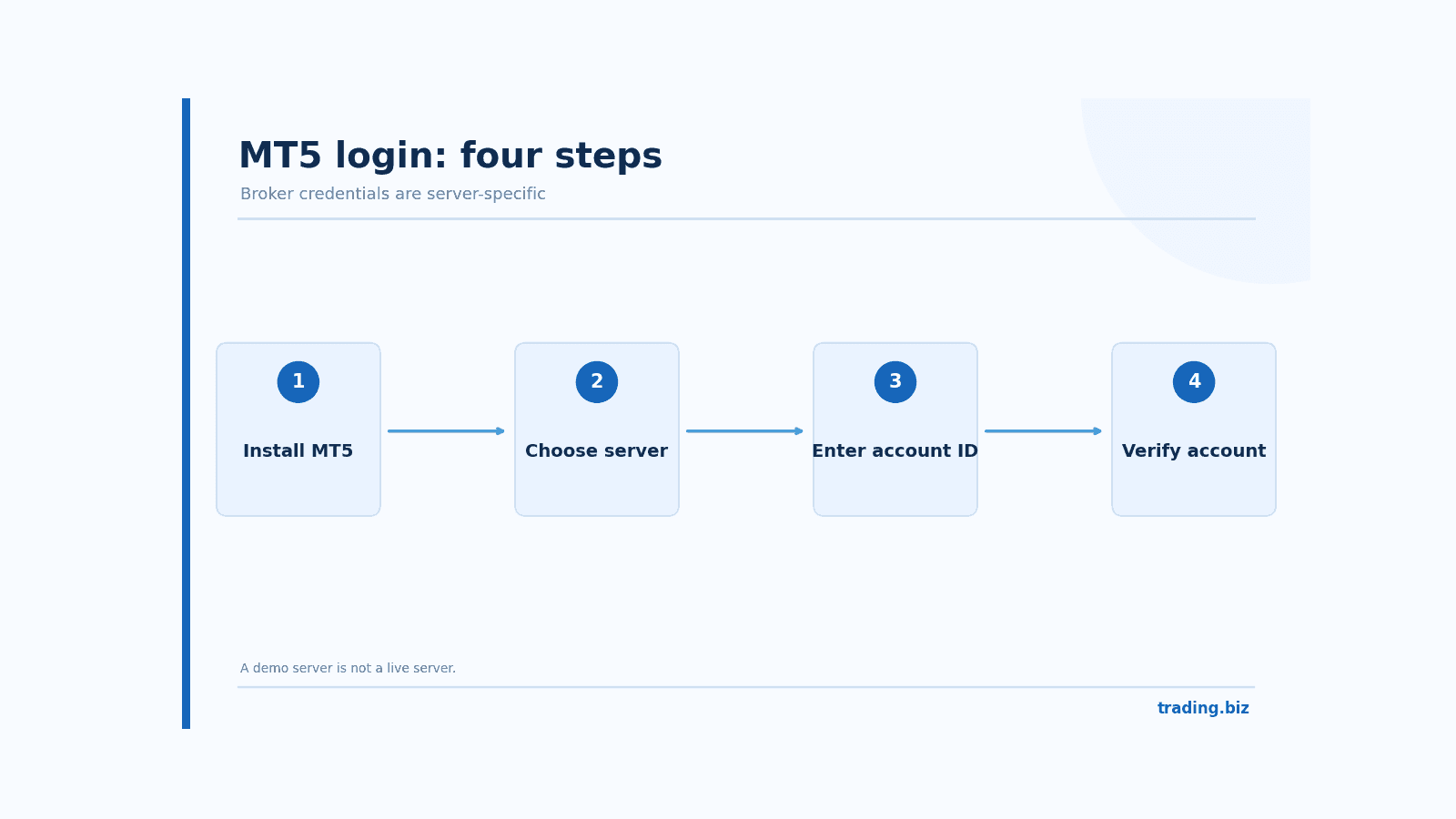
Figure 1. The four checkpoints for connecting an MT5 broker account.
Connecting MetaTrader 5 to a broker account
A broker normally provides an account ID, an account password and a server, sometimes with a demo/live distinction. Open File, Login to Trade Account on desktop, or add an account on mobile. Search for the broker's server, select the correct one and enter the details. If you pick a similarly named demo server for a live account, authentication can fail despite the correct password.
A read-only investor password is not the same as a trading password. With read-only access you can examine a portfolio but cannot place orders. That distinction is useful for account monitoring and important when diagnosing a greyed-out New Order button.
The first five checks after MT5 login
Confirm the server, account currency, balance, leverage and whether the account is demo or live. Open Market Watch and inspect the symbol list. A pair might have a suffix, different contract size or different trading hours from what you expected. Right-click Symbol Specification to find lot size, minimum volume and margin details where the broker provides them.
MT5 charts, timeframes and indicators
A chart has a symbol, timeframe and display type. A candle chart gives open, high, low and close for each period. Start with one instrument on a higher timeframe, then inspect a shorter timeframe only if it improves your entry planning. Adding eight indicators before you can read price is usually counterproductive.
Common indicators include Moving Average, RSI, MACD and Bollinger Bands. On desktop, open Insert, Indicators, select the tool and adjust inputs. A 14-period RSI uses fourteen observations according to its smoothing method; a 50-period moving average summarizes the last fifty bars. Neither number has a built-in predictive guarantee.
Adding a custom indicator or expert advisor
Use File, Open Data Folder to reach the appropriate MQL5 folders on desktop. Custom indicators belong under MQL5/Indicators; expert advisors under MQL5/Experts. After copying a trusted file, refresh the Navigator or restart the terminal. Never enable DLL imports because a stranger's download page says you must. Test custom code on a demo account first.
Placing MT5 market orders, pending orders and stop levels
The New Order ticket asks for a symbol and volume. A market order seeks execution now, but the price can differ from the quote displayed when you clicked. A buy limit instructs the broker to buy at a chosen price below the current market; a buy stop generally activates above it. Stop-limit orders set an activation level and a separate limit price, subject to broker support.
Set stop loss and take profit with the trade idea. Stops are instructions, not insurance against gaps or extreme slippage. Check volume in lots, because a tiny-looking number such as 0.10 can still represent meaningful exposure. On a standard EUR/USD contract of 100,000 euros per lot, 0.10 lot is typically 10,000 euros of base-currency notional exposure. Margin required depends on leverage and current rates.
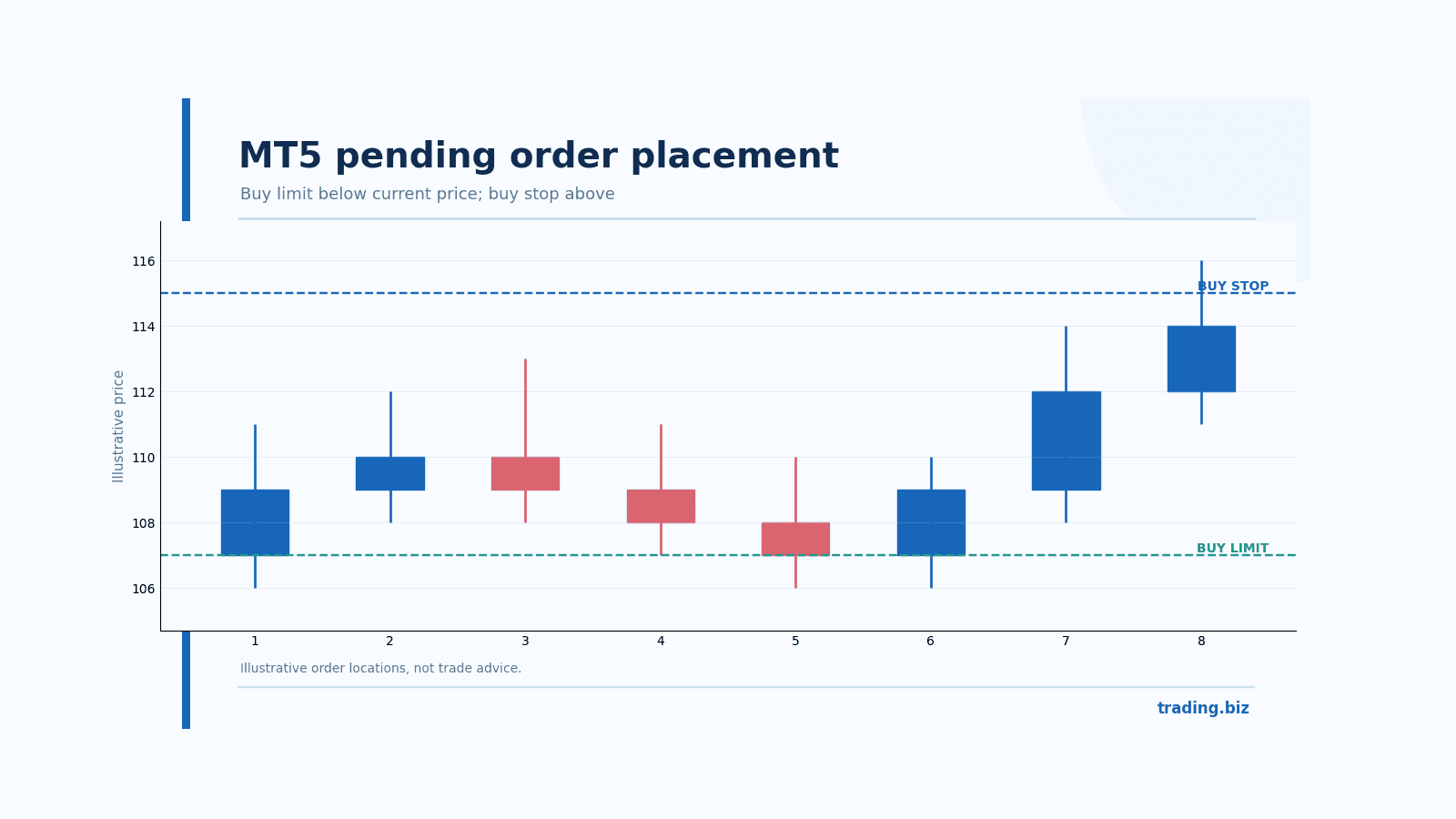
Figure 2. Buy stop and buy limit orders sit on different sides of the current price.
Example MT5 risk check before pressing Buy
Suppose a standard EUR/USD contract gives roughly $10 per pip at one lot when USD is the quote currency. At 0.10 lot, a 25-pip stop represents about $25 of price risk, excluding spread, commission and slippage. If your account is $1,000, that is roughly 2.5% of equity. It is often wiser to reduce volume than to move the stop arbitrarily close to the entry.
When you still need to download MT4
An older expert advisor coded for MQL4 or an indicator supplied only as an EX4 file usually means you need MT4. Confirm that your broker still offers an MT4 account. Merely installing the MT4 terminal does not convert an MT5 trading account into an MT4 account. Keep backups of your custom files and templates before changing machines.
A practice order that teaches the whole workflow
Open a demo account and choose an instrument whose specification you understand. Write the current bid, ask and spread in your notes. Decide on a hypothetical buy limit below the market, set a stop price at a logical invalidation level and calculate the position size from the distance. Enter the pending order, then check the Trade tab. The ticket should display the requested price, volume and any attached stop or target.
Next, practice modifying the pending order and canceling it. Look at History afterward to see how the platform labels canceled orders. Repeat with a buy stop above the market so you understand the difference between buying a pullback and buying a breakout. This exercise reveals order-ticket mistakes before they become expensive.
What to do if an MT5 order is rejected
A rejection can come from market hours, insufficient margin, minimum lot increments, an invalid stop distance or a symbol that is temporarily unavailable. Read the exact platform message. Then examine Symbol Specification and the broker's trading schedule. Do not increase leverage blindly to force an order through. Some errors mean the intended position violates the account's rules; other errors mean the software did exactly what it was supposed to do.
An order labeled Placed is not the same as an order labeled Filled. A pending instruction can sit on the server waiting for its conditions. Keep that distinction in mind when checking exposure, especially if you have several orders on related instruments.
Understanding netting and hedging modes on MT5
Some MT5 brokers use netting accounts, where opposite trades in the same instrument reduce or close the existing position. Others offer hedging accounts that can maintain separate buy and sell positions. This affects how stops, trade tickets and position histories behave. A strategy written for a hedging account may not behave the same way on a netting account, even if both use MT5. Check your broker's account specification before running an expert advisor.
When experimenting with a new EA, test the broker's symbol suffixes, contract sizes and execution mode in the strategy tester and in demo. A backtest built using generic data can miss real commission and spread differences. Keep a copy of the inputs so that a promising historical curve can be reproduced. A settings file with no version number is an invitation to lose track of what produced the result.
FAQ about MetaTrader 5
Is MetaTrader 5 a broker?
No. It is trading software that connects to participating brokers. Account permissions, funding and execution remain governed by the broker's terms.
Can I use one MT5 account on desktop and mobile?
Usually yes, with the same trading-server credentials. The interfaces differ and custom desktop indicators generally do not transfer into the phone app.
Why does MT5 say invalid account?
Check the account ID, password and exact server. A wrong demo/live server is a frequent cause. Contact the broker using official support if credentials have expired.
Are all MT5 indicators free?
The platform includes built-in indicators, while custom tools can be free or paid. Download third-party code cautiously and test it without real money.
Does a stop loss guarantee my price?
No. A stop order can fill at a worse price during gaps or thin liquidity. Risk calculations should allow for that possibility.
Official reference: MetaTrader 5 official help
Find Your Perfect Broker: Explore Our List Now!
Choose the best with our expert-selected options
Find Your Perfect Broker: Explore Our List Now!
Choose the best with our expert-selected options
Discover top binary options brokers tailored to your region. Browse our curated lists by country: