Updated:October 16, 2026

10 min
10 min

A $5 headline and a $20 card minimum can both appear in Pocket Option’s payment information. For a Pocket Option deposit in 2026, the amount depends on the route you choose. We will explain those numbers, the costs outside the platform and what to do when money leaves your bank but has not reached the trading balance.

Author

Depositing money into your Pocket Option account is the gateway to exploring the full range of the platform’s services. In this article, I’ll show you all the different ways to deposit funds into your Pocket Option account. I’ll also provide context on the platform’s deposit process, highlighting how long a deposit takes, the most convenient deposit method, and more. Let’s dive in.
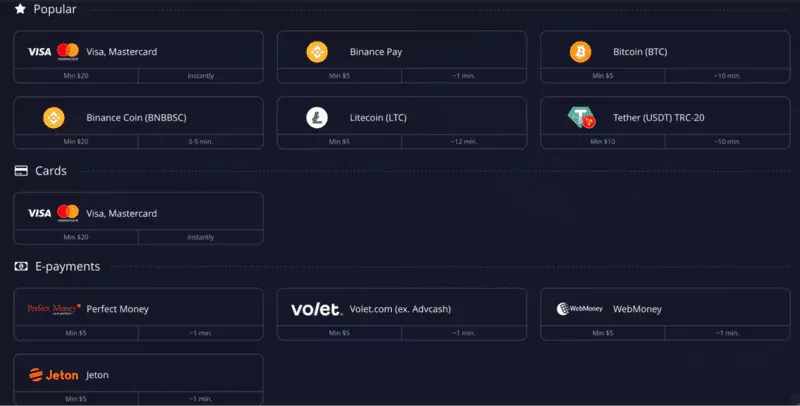
Pocket Option advertises deposits from $5. Its published minimum-deposit guide gives example thresholds of $5 for e-wallets and cryptocurrency, $10 for bank transfers and $20 for cards. The same page says amounts can vary by method and country.
There is another figure in the general agreement: $0.10 for deposits unless otherwise specified. That broad clause does not mean every payment channel accepts ten cents. The method selected in the account can specify a higher minimum.
For an actual transfer, use the amount shown beside that particular currency and method. If the receiving minimum is $20, a $19 transfer is below it even if another route accepts $5. Network fees and conversion can also change what reaches the receiving side.
Learning the interface does not require funding. The Pocket Option demo guide explains the virtual balance, which cannot be withdrawn and does not come from a card or bank payment.
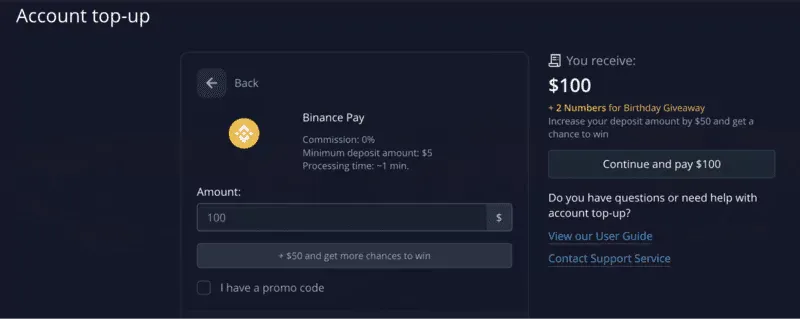
Pocket Option lists payment methods with 0% platform commission. Your bank, wallet or card issuer can still charge for the transaction, currency conversion or network transfer. The platform's fee and the payment provider's fee belong to different parts of the journey.
Fixed charges are particularly noticeable on a small deposit. A hypothetical $1 transfer cost is 20% of a $5 payment. On $50, the same cost is 2%. That does not make a larger deposit a better trading decision; it shows why the fee needs to be calculated before choosing a route.
Also look at where the charge comes from. If a $2 fee is deducted from a $50 transfer, $48 is sent onward before conversion. If it is charged separately, the bank may debit $52 while sending $50. The receipt should make that distinction clear.
Read the withdrawal process before choosing a funding method, because the route for getting money back affects the choice too.
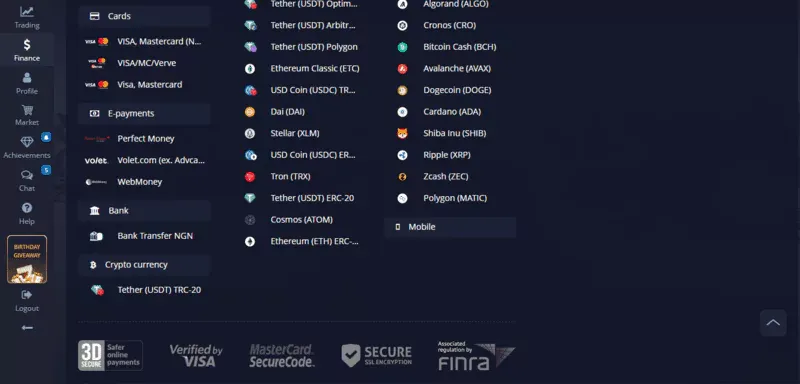
The deposit screen may offer cards, electronic payment services, bank transfers and cryptocurrency. The methods available to one account can differ from those shown for another country. Here is what changes when you choose between them.
Use a card held in your own name. Enter the requested billing details and complete the bank's authentication, such as a confirmation in its app. A declined authorisation needs the issuer's reason before another attempt; a bank may reject the merchant or the type of transaction.
An e-wallet can provide another funding route if it is listed for your account. Check the sending currency and any conversion. A wallet's balance and the amount delivered to the trading account can differ after fees, even if both screens initially show the same currency symbol.
Copy the beneficiary details and reference from the current payment request. The reference helps the receiver match the transfer to your account. Local and international transfers can follow different processing schedules, so a transfer sent late on Friday may need business days to arrive.
Match the asset, network and destination in the payment request. For example, a USDT request for one network does not authorise sending USDT over another. Keep the transaction hash after sending; it identifies the on-chain transfer if a credit needs tracing.
Pocket Option is a trading platform that accepts several funding routes. Sending it cryptocurrency does not mean you are using a cryptocurrency exchange to buy and hold that coin. Our platform review explains the trading service more broadly.
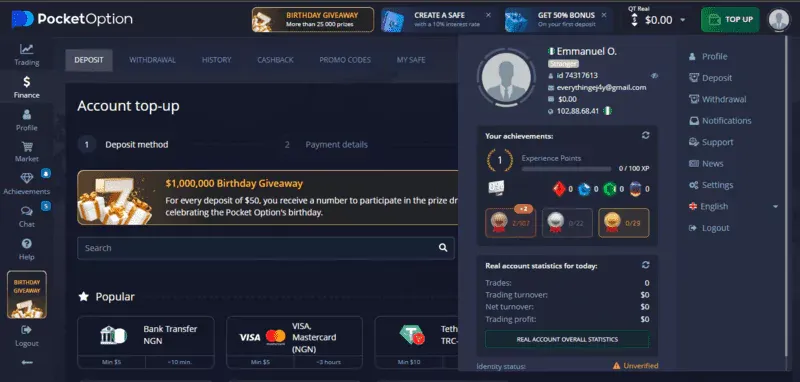
Open the Pocket Option website and sign in. The login guide covers account access if that is where you are stuck.
The funding page is reached through Finance, then Deposit, or through the corresponding account-menu option. From there, work through the payment in this order:
Return to the transaction history and look for the deposit status. A bank app showing “sent” describes the sending stage. The trading account still has to identify and credit the payment.
Avoid sending the same amount again while the first transfer is pending. Two requests for $50 can become $100 of actual payments once both complete. Refreshing the balance is a useful screen check, but it cannot resolve a rejected or unreceived transfer.
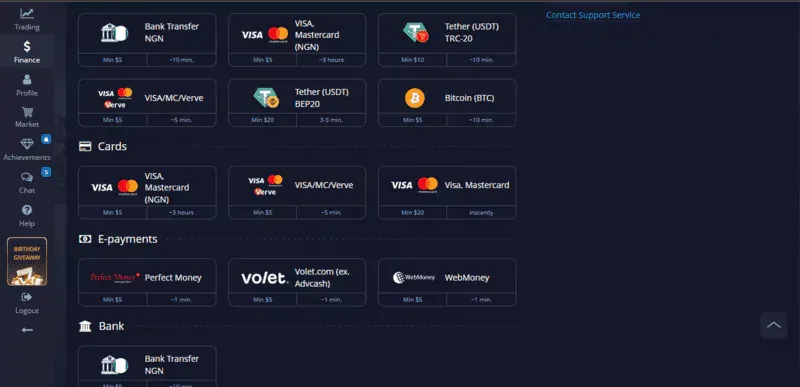
Use the estimate attached to the selected method. Card payments, electronic services and crypto can complete quickly, but there is no reliable single arrival time covering every country, currency and account.
A card payment can pause for issuer authentication or review. A cryptocurrency transfer first needs to be broadcast and reach the required network confirmations. A bank transfer can depend on business days, cut-off times and intermediary processing. These are different reasons for waiting.

For a missing payment, find the stage it has reached. If the bank declined it, the platform has nothing to credit. If the bank completed it, keep its reference for a trace. If a crypto transfer is still unconfirmed, the network status needs attention before the receiving balance can change.
The payment policy assigns responsibilities to both the platform and payment providers. The transaction's stated window is more useful than an old promise that every bank transfer arrives in ten minutes.
The provider's public guide gives the example minimums below. These figures help compare routes; the current account screen determines the amount accepted for your country, currency and provider. Maximums are also specific to that payment route.
| Method | Minimum in the public guide | Extra costs to allow for | What determines arrival |
|---|---|---|---|
| Card | $20 | Issuer charges and conversion | Bank approval and payment processing |
| Bank transfer | $10 | Sending or intermediary fees | Bank schedules and account crediting |
| Electronic wallet | $5 | Wallet fees and conversion | Provider processing and crediting |
| Cryptocurrency | $5 | Network or sending-service fees | Network confirmations and crediting |
Compare what is actually available before choosing. If a card route is absent, the public card figure cannot make it available to that account. If a crypto route shows a higher minimum than $5, calculate the receiving amount against that figure. Keep the selected method's instructions with the receipt rather than relying on this table as a payment request.
Suppose you want $50 credited through a supported dollar-denominated e-wallet. Open Deposit, select that wallet and confirm that the amount meets its displayed minimum. Choose the account currency before continuing to the provider.
The wallet now shows a hypothetical $1 processing charge. If it bills the charge separately, your wallet needs $51 to send the full $50. If it deducts the charge, only $49 goes onward. Read the confirmation to see which calculation applies.
Complete the wallet's authorisation, save the payment ID and return to Pocket Option's transaction history. Compare the credited amount with the amount actually sent. If $49 arrives because the receipt shows a $1 deduction, the difference already has an explanation.
If the wallet confirms completion but the account remains uncredited beyond the displayed window, send support that payment ID. The example follows one transfer from amount selection to a traceable receipt.
For a declined card, start with the bank's response. Check billing details and any pending authentication. Ask the issuer about the specific decline before repeating the payment. Changing the amount several times may produce several attempts without resolving the reason.
For a completed bank payment, verify the beneficiary and reference against the request. Give the bank and platform the transaction reference, amount, currency and date. Those details let them investigate the same transfer.
For crypto, compare the asset, network, destination and transaction hash with the payment request. An unconfirmed transfer and a wrong-network transfer need different responses. Recovery of the latter may be impossible.
If the platform marks a deposit complete but the balance looks unchanged, refresh the page and confirm the selected account. If the discrepancy remains, send the transaction record to support. Keep passwords, card security codes and unrelated statement details out of the message.
Decide how much you are prepared to put at risk before opening the funding page. A low minimum is useful for understanding the payment requirement; it does not limit future losses if you keep adding money.
Then read the withdrawal requirements for the method you intend to use. The provider's terms call for payments through accounts belonging to the client and link withdrawals to the funding route. It is easier to resolve an ownership question while the money is still in your bank.
Country eligibility matters too. The FCA warning about PocketOption states that the firm lacks UK authorisation. Residents elsewhere need to establish the position for their own country and service.
If a bonus is selected, read what happens when you withdraw your own deposit before completing its turnover requirement.
If you only want to learn the controls, choose the demo balance. For a live payment, keep the amount, selected method and receipt together. The questions below cover the funding details that most often cause confusion.
It is a transfer of real money into a live trading account through an available payment method. The deposit request specifies the currency, receiving details and amount limits. A demo balance uses virtual funds and does not require this transfer. Keep the payment reference until the live balance has been credited.
Sign in, open Deposit under Finance or the account menu, select an available method and enter the amount. Follow the bank or wallet confirmation, then look at the account's transaction history. A receipt showing that money was sent and a completed account credit describe different stages of the same payment.
Pocket Option operates a trading platform, but the FCA warns that it is unauthorised in the UK. Check the regulatory position where you live before funding. A completed deposit does not establish investor protection or guarantee a withdrawal. The trades themselves can also lose the full stake.
The public guide advertises deposits from $5 and gives example minimums of $20 for cards, $10 for bank transfers and $5 for e-wallets and crypto. Actual limits can differ. Listed methods show 0% platform commission, while banks, wallets, network fees and conversion can add costs.
Follow the window displayed for the selected route. Card approval, bank schedules and crypto confirmations affect different methods. If a completed payment is missing after that window, send support the receipt and reference. For a bank decline or an unconfirmed blockchain transaction, investigate that sending stage first.
Find Your Perfect Broker: Explore Our List Now!
Choose the best with our expert-selected options


Find Your Perfect Broker: Explore Our List Now!
Choose the best with our expert-selected options
Discover top binary options brokers tailored to your region. Browse our curated lists by country:
11694