Updated:October 16, 2026

9 min

4788
Download Deriv Mt5 (2026)
As someone who’s traded for a long time, I know Deriv is a name you can’t escape in the industry. Deriv’s MT5 platform stands out as one of its top offerings. Deriv MT5 is a version of Meta Trader 5 (MT5) that Deriv has customized with a few useful features. I’ve used Deriv MT5 for years and learned how it works and why it’s popular. Read on to learn all about Deriv MT5, including if you should download it and how to do it.

Joel Lim
Author

What is Deriv MT5?
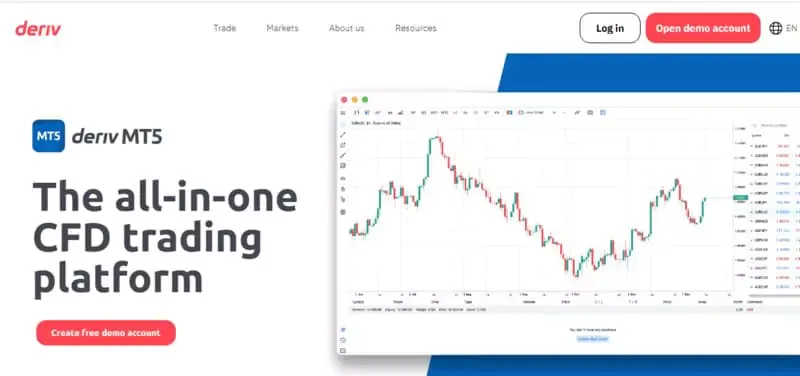
Deriv MT5 is a Contracts For Difference (CFDs) trading platform built for traders like me who like to trade on a platform with sophisticated tools and multiple markets. If you want to trade on unique markets like EFTs and Derived indices, this is the place for you.
There are three account types on Deriv MT5, each with unique offerings, making it a buffet for versatile traders like me. Here’s a summary of what the accounts offer:
| Account | Markets | Leverage |
| Derived | Derived fx, Synthetic indices, Basket indices | Up to 1:1000 |
| Swap-free | Stocks, Stock indices, Forex: major and minor, ETFs, Derived indices (Synthetic indices only) | Up to 1:1000 |
| Financial | Stocks indices, Stocks, Forex, Commodities, ETFs, Cryptocurrencies | Up to 1:1000 |
It’s important to note that for Financial STP (Labuan), the leverage is up to 1:100. Also, in the EU, Derived FX and basket indices aren’t available. You can only trade the assets above with one CFD account. Finally, although CFD trading is legal in most of the world, it’s illegal in the US and Brazil. Therefore, you can’t use Deriv MT5 if you’re in those countries.
For a broader Deriv MT5 overview, see our Deriv broker review before you download Deriv MT5 for live CFD trading.
Benefits of Trading with Deriv MT5

After using the Deriv MT5 app for a few days, I found some benefits you might not find anywhere else. Here’s a few of them:
Endless Assets
Deriv MT5 has a wide range of tradeable assets to suit any type of trader. Whether you specialize in commodities, cryptocurrencies, forex, or derived fx, you can trade on MT5. The versatility also allows you to spread your portfolio. It will enable you to try different assets and decide what works best.
Free Demo Account
Before I trade on any platform, I use the demo account to get a feel of its features and learn how it works. Deriv MT5 has a free demo account that you can use without logging in or giving personal information. Therefore, anyone can use it, even if they don’t trade on Deriv.
Another benefit of the demo account is that you can practice your trading strategies with live markets. Therefore, you can test your plan without risking real money if you’re not confident in your plan.
Copy Trading and Signals
Deriv’s MT5 incorporates MetaTrader 5’s powerful signal and copy trading features. This allows you to copy successful traders’ strategies. Therefore, if you’re a beginner, you can use this feature to learn from the best.
No Overnight Fees
The swap-free account has no overnight fees or interest. This means you can hold a position for longer without worrying about the strain it will have on your profits. This is important because I often keep my position for a long time and end up paying interest on other accounts.
Sophisticated Tools
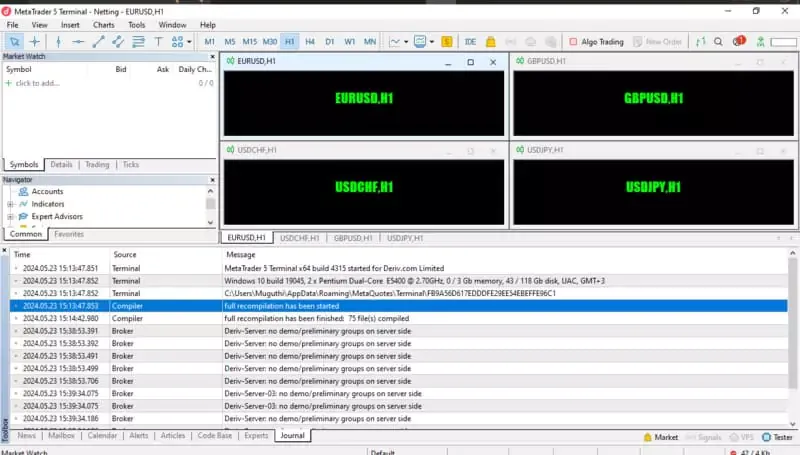
While using the Deriv MT5 accounts, I found many helpful study and analysis tools that are intuitive and useful. Everything is on the screen, and functions like moving the tool around are a breeze. You can also open multiple trading windows, track all your tools, and detach every window if necessary.
User-Friendly Interface
While experienced traders frequently rely on Deriv MT5, its user interface remains intuitive and beginner-friendly. Its learning curve is shallow, and anyone can briefly practice on the demo account and start trading immediately.
Available on Different Devices

Available on Different Devices
Another important factor I consider when choosing a trading platform is its availability. Deriv MT5 is accessible online and through dedicated desktop and mobile apps for convenience. For instance, I use the mobile app even when I’m on vacation to keep up with the markets without carrying a laptop.
If you want to test the platform first, our Deriv demo guide explains how to open a practice account before an MT5 Deriv download.
How to Connect Deriv to the Web Terminal
One of the best ways to use MT5 is on its web terminal. It’s easy: if a device has a modern web browser, you can sign in and start trading. Below are the steps to connect to Deriv MT5’s web version:
-
Access the Deriv website with this link.
-
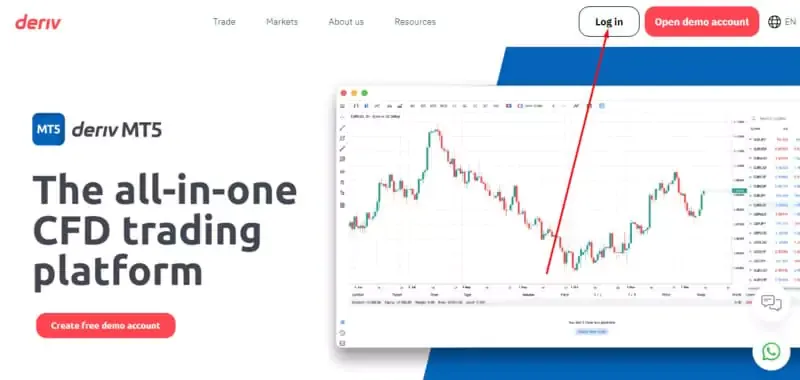
Click on the log-in button.
-
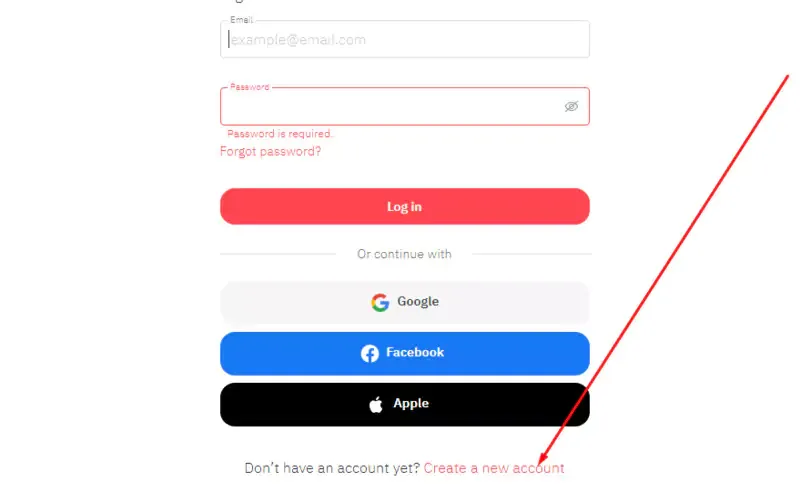
Sign up with your email or use your Google or Facebook account.
-
Scroll down to CFDs and select the Deriv MT5 account you want.
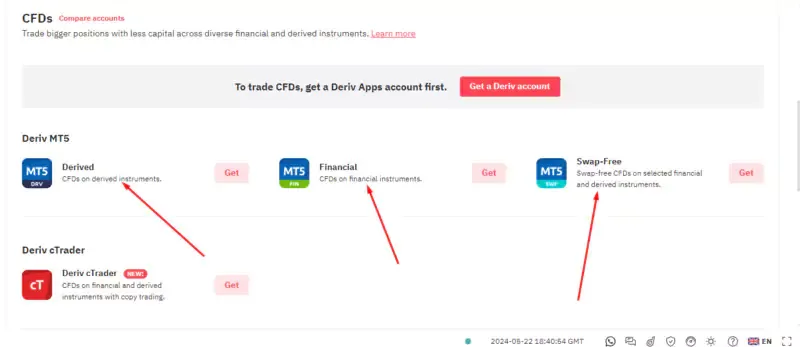
-
Go through the required processes and accept the Terms of Use.
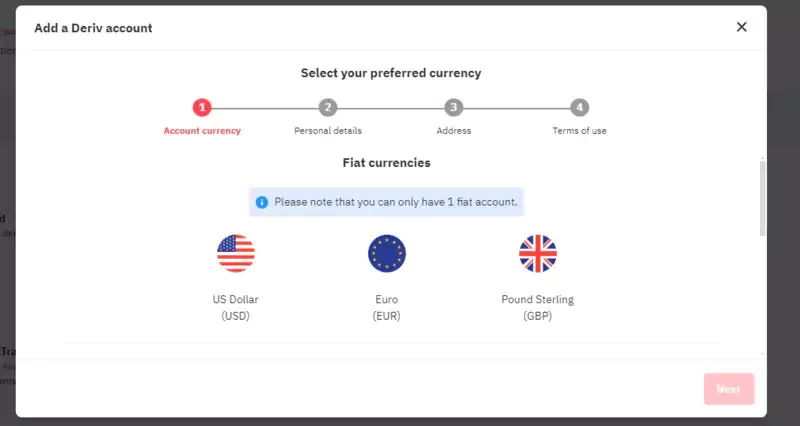
You can now start trading on your Deriv MT5 account with any browser.
For a browser alternative, see our Deriv TradingView guide and compare it with the Deriv MT5 web terminal.
How to Connect Deriv to the MT5 Desktop App
If you plan to use Deriv MT5 often, I’d recommend installing the dedicated Deriv app on your desktop. The desktop app has a similar interface to the web version. The dedicated app is often smoother and can run independently on your computer, giving it access to more resources.
Here’s how you install the Deriv app on your desktop:
-
Go to Deriv’s site using this link.
-
Click on Traders Hub.

-
Select Deriv MT5.
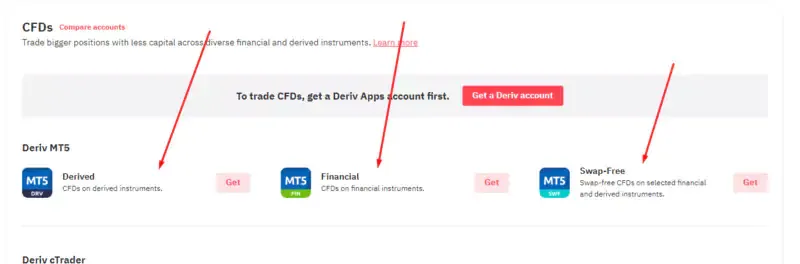
-
Scroll to the “Get trading with Deriv MT5” section and click on your desktop’s OS.
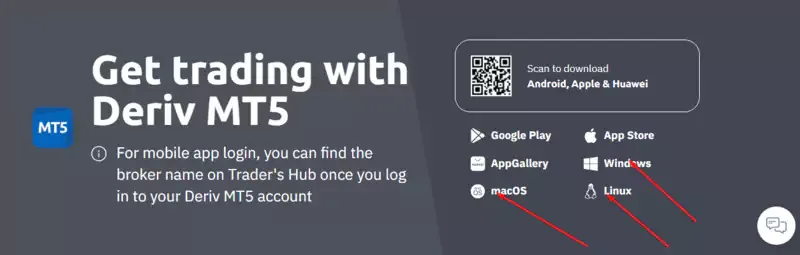
-
The app will start downloading instantly.
-
Open the download file and go through the installation process.
-
When the installation is done, you can access MT5 from your computer.
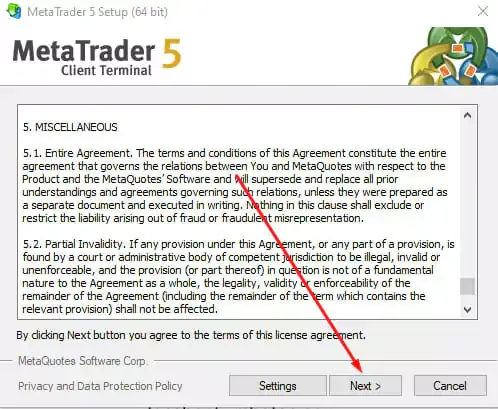
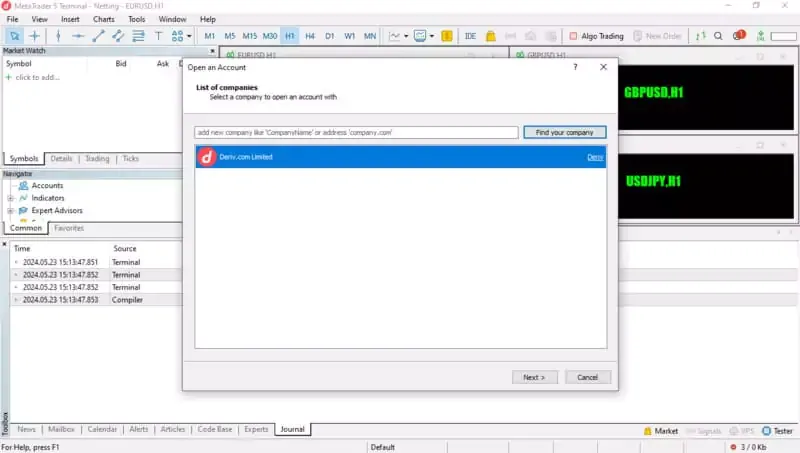
However, you’re not done yet. You need to connect your Deriv account to the Deriv MT5 desktop app. Here’s how you do it:
-
Open your Deriv MT5 desktop app.
-
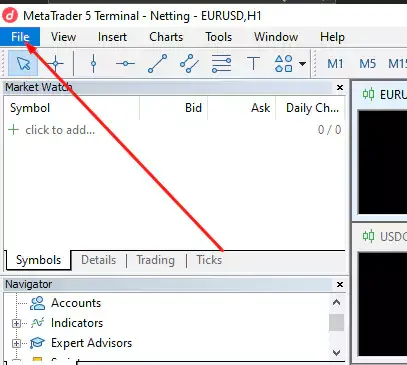
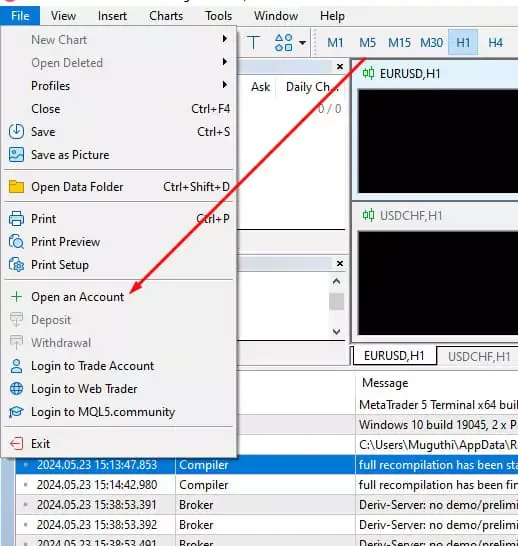
Open the File drop-down menu, then select Open an account.
-
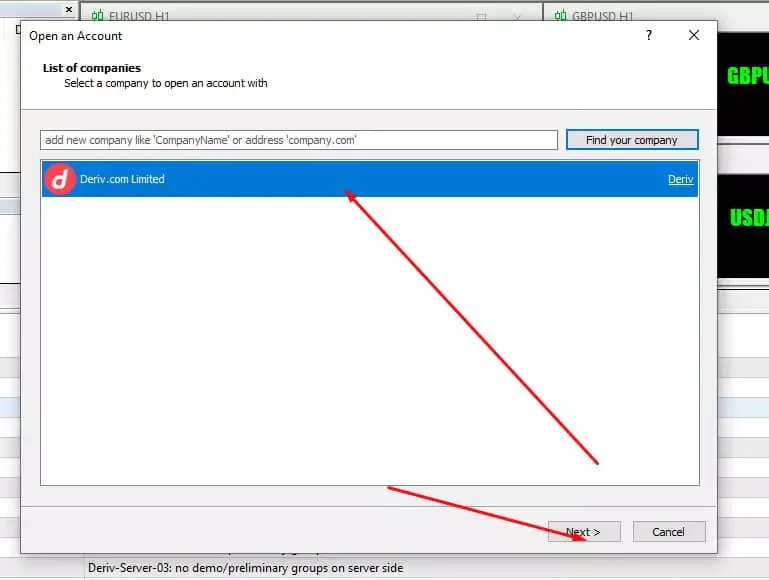
Select Deriv.com Limited as your company, then click on Next.
-
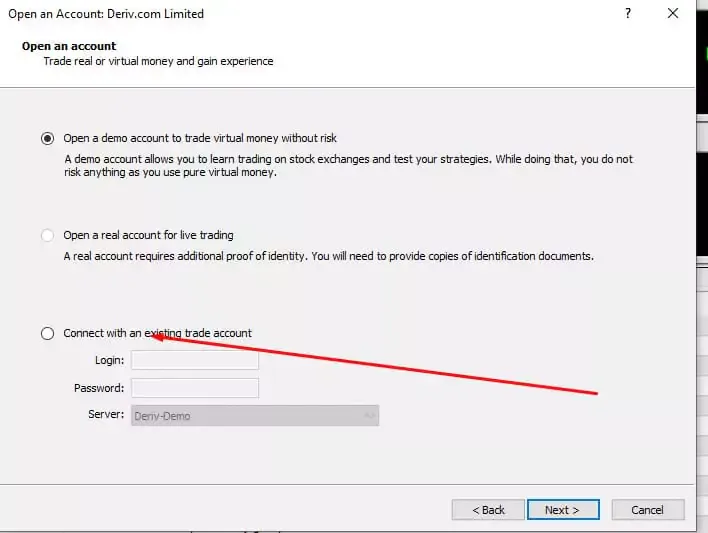
Click on Connect to an existing account.
-
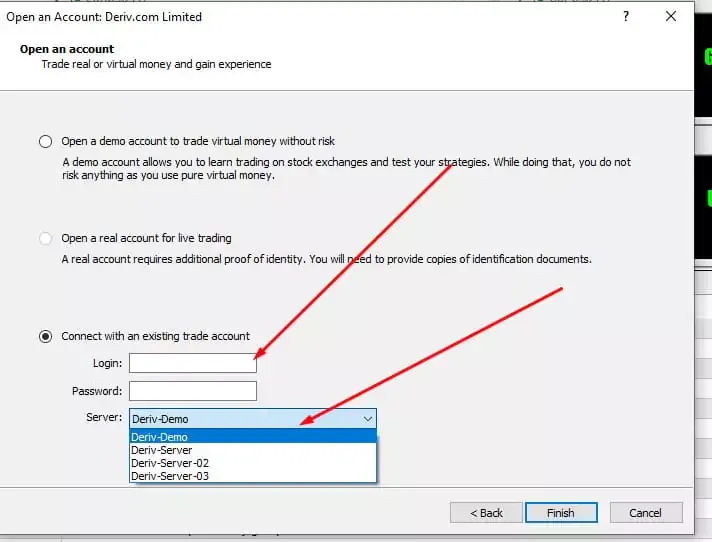
Enter your login details and server.
-
Click Finish.
For more on Deriv MT5 download for PC and setup, see our Deriv real account and MT5 guide.
How to Connect Deriv to the Mobile App
You can also install the Deriv MT5 app on your phone. This is useful if you trade on the go. Let’s look at how you install the app on your phone. Go to Deriv’s site using this link.

1. Select Trade.

2. Choose Deriv MT5
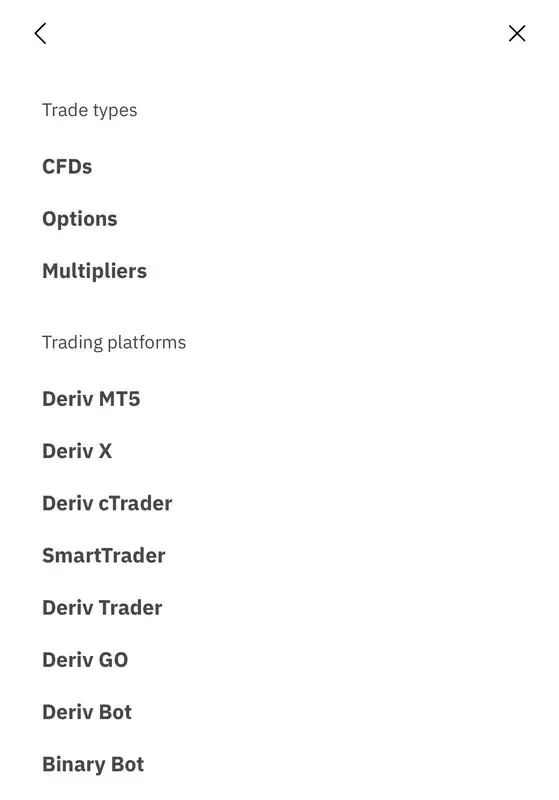
3. Scroll down to the “Get trading with Deriv MT5” section and click on your phone’s OS.
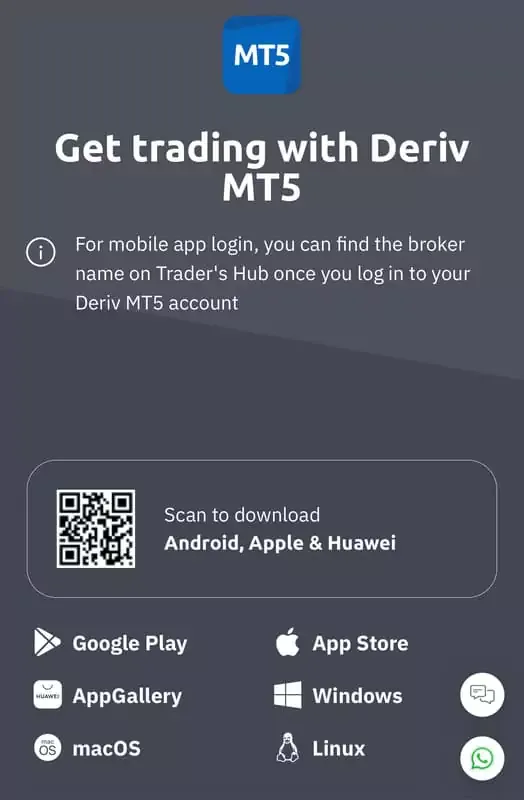
4. You will be redirected to your phone’s app store to download the Deriv MT5 app. However, like on Desktop, you must connect your Deriv account to the MT5 app. Fortunately, the process is just as simple.
Here’s what you do:
-
Open your MT5 app.
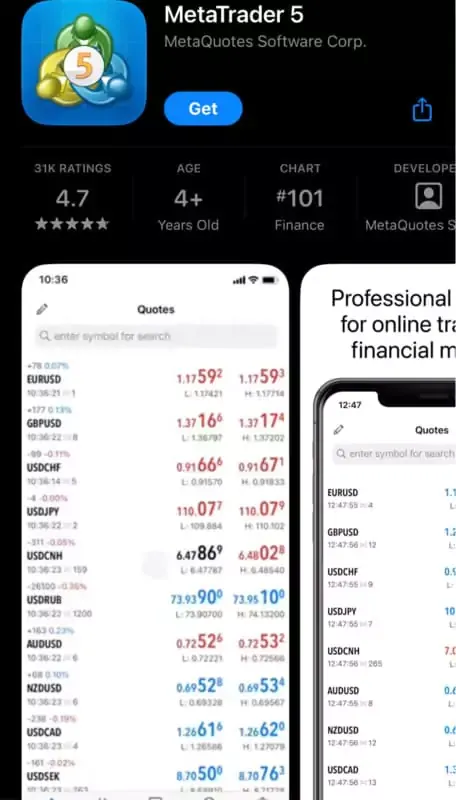
-
Tap on Options (three lines at the top right of your screen.)
-
Tap on Manage accounts.
-
Select Add Account (plus button.)
-
On the search bar, search for Deriv Limited and tap on it.
-
Enter your login details and tap the “Log In” button at the bottom.
For payment details after your MT5 Deriv download, check our Deriv deposit and withdrawal review before funding the account.
Practical Example: Installing Deriv MT5 on a Windows PC
Suppose you want a Deriv MT5 PC download on a Windows 10 laptop. Open Deriv Trader's Hub, choose Deriv MT5, then use the official Windows download. Run the installer, launch MT5, and choose the Deriv server linked to the account in your dashboard. Enter the MT5 login details, not just the email and password used for the main Deriv account.
Before a live CFD order, switch to a Deriv demo account and open one chart. Check that prices update and that your account appears in the Navigator panel. If login fails, compare the server name and MT5 account number with Trader's Hub instead of reinstalling the software. Deriv supports Windows 7 and later, so Windows 10 is covered. Check these details before continuing.
Common Mistakes When Downloading Deriv MT5
A common mistake is downloading MT5 from a third-party site when Deriv provides official Windows, macOS, Android, iOS, and Huawei routes. Another is using the main Deriv password in the MT5 fields instead of the credentials attached to the MT5 account.
PC users also sometimes select the wrong Deriv server. That can leave the terminal disconnected even when the account number is correct. Check Trader's Hub first. On mobile, install the app through the store link opened from Deriv rather than an APK from an unknown source.
A successful installation does not mean the account is ready for live trading. Confirm the account type and available markets first. If you only want to practise, use Deriv demo before depositing real money.
Final Words
Deriv is one of the most famous names in trading forums. MT5 accounts target CFD traders seeking an advanced platform with various features and tools. I often use the free demo to practice new trading strategies and the mobile app to follow the market while on vacation.
Before moving from demo to live CFDs, download Deriv MT5 only from Deriv or an official app store, confirm the server in Trader's Hub, and review your payment options. The FAQ below covers setup, safety, and beginner use.
FAQ
What is download Deriv MT5?
It means installing Deriv's MetaTrader 5 platform for CFD trading. Deriv offers desktop downloads for Windows and macOS, mobile versions, and a web terminal with no installation.
How does download Deriv MT5 work in 2026?
Open Deriv MT5 in Trader's Hub, choose your device, install the official app, then log in with the MT5 account number, password, and server linked to it.
Is Deriv safe and legit?
Deriv operates through regulated group entities licensed in the British Virgin Islands, Cayman Islands, Mauritius, Vanuatu, and Labuan. The entity serving you depends on your country and product.
How do I get started with download Deriv MT5?
Log in to Deriv, open an MT5 account in Trader's Hub, choose the official download for your device, install it, and connect with the MT5 credentials shown for that account.
Is it good for beginners?
MT5 can suit beginners who start on demo. It has advanced charts and order tools, so practise basic order handling before using real funds. Deriv provides a free MT5 demo account for CFD practice.
Find Your Perfect Broker: Explore Our List Now!
Choose the best with our expert-selected options


Find Your Perfect Broker: Explore Our List Now!
Choose the best with our expert-selected options
Discover top binary options brokers tailored to your region. Browse our curated lists by country: