Updated:October 22, 2026

16 min
16 min

The Quotex demo account gives you $10,000 in virtual funds and full access to the trading platform with no deposit and no registration required. It is not a preview version or a limited trial. Every asset, every indicator, and every chart tool available on a real account is present in the demo, running on the same live price feed. This guide covers how it works in 2026, how to use it effectively, what changes when you switch to real money, and the three new sections traders consistently search for: demo versus real account, how to reset the balance, and how to access it on PC and mobile.

Author
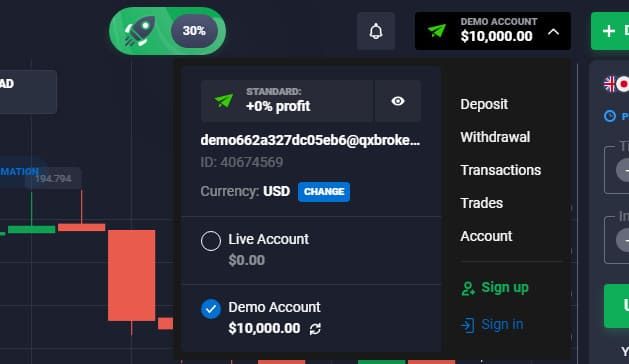
Yes. Quotex offers a free demo account to all users, including those who have not yet registered. You can open the quotex demo directly from the homepage by clicking the practice account button, no email, no phone number, and no documents required. A $10,000 virtual balance loads immediately.
If you create a free account, your trade history, indicator settings, and chart layouts are saved between sessions. Without an account, everything resets when you close the browser. Registration takes under two minutes and requires only an email and a password.
The demo has no expiry date. Unlike some brokers who cut off demo access after 7 or 14 days, Quotex places no time limit on it. You can use it for a week or for a year and the account stays fully functional.

The demo account is not a scaled-down version of the platform. It mirrors the real account feature for feature. Here is what you get:
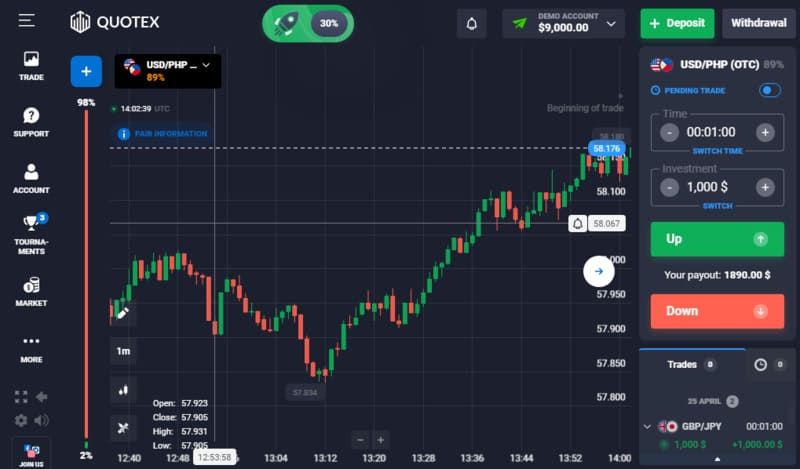
Every new account starts with $10,000 in virtual funds. When the balance runs low, you can reset it back to $10,000 in one click, unlimited times. There is no waiting period and no form to fill in. The reset option appears under the balance display in the dashboard.
Quotex offers over 400 instruments in total. For binary and digital options trading specifically, around 68 instruments are available across five categories:
| Asset class | Examples | Available in demo |
| Forex pairs | EUR/USD, GBP/JPY, USD/IDR, CAD/CHF | Yes, 43+ pairs |
| Cryptocurrencies | BTC, ETH, LTC (24/7 including weekends) | Yes |
| Commodities | Gold, Silver, Oil | Yes, 4+ instruments |
| Stocks | Microsoft, Apple, Boeing, Pfizer | Yes, 8+ stocks |
| Indices | Major global indices | Yes |
| OTC assets | Weekend and off-hours instruments | Yes, 40+ OTC pairs |
OTC (over-the-counter) assets are particularly useful in the demo context because they are available 24/7, including evenings and weekends when standard forex markets are closed.
The platform integrates over 30 technical indicators directly in the web interface. These include RSI, MACD, Bollinger Bands, moving averages, Fibonacci retracement, Ichimoku clouds, and others. You do not need an external charting tool. Three chart types are available: candlestick, line, and bar. Timeframes run from 5 seconds up to 1 month.
Minimum trade size is $1. Maximum is $1,000. Payout rates in demo mode are identical to live account rates: up to 98% on a correct prediction, depending on the asset and expiry window. Trade durations run from 1 minute to 4 hours. You place a trade by predicting whether the asset closes higher or lower than the opening price at expiry.
Quotex Demo Trading on Indicators
Using these trading indicators in your Quotex demo allows you to see how they react to real-time data.
| Indicator | What it measures | Best used for |
| RSI (Relative Strength Index) | Overbought / oversold momentum | Spotting potential reversals |
| MACD | Trend direction and momentum shifts | Confirming breakouts |
| Bollinger Bands | Volatility and price range | Range-bound markets |
| Moving averages | Trend direction | Filtering trade bias |
| Fibonacci retracement | Key support and resistance levels | Setting entry and target zones |
You can start without registering. Go to the official Quotex website (qxbroker.com) and click the demo or practice button. The terminal opens with $10,000 loaded and you can place your first trade immediately. No personal details, no KYC, no minimum deposit.
To save your progress, create a free account:
Once registered, you switch between demo and live mode with one click on the balance display in the top-right corner of the terminal. The switch is instant and both modes share the same interface.
The demo is the right starting point, but there are things it cannot teach you. Knowing the difference before you switch matters.
The mechanics transfer completely. The same interface, same assets, same indicators, and same payout rates apply to a real account. Nothing about how you analyze a chart or place a trade changes.
What does change is the emotional weight. Losing $20 of virtual money on a bad trade produces no real reaction. Losing $20 of money you deposited and can see leaving your balance produces a completely different feeling. Most traders find their first few weeks of real-money trading expose decision patterns they did not notice in demo: exiting trades early, doubling position size after a loss, overtrading after a win.
The minimum deposit to go live is $10. Starting at the minimum and trading with $1 to $2 per contract initially mirrors the position sizing discipline you should have built during demo practice. For full details on funding methods, processing times, and withdrawal steps, see the Quotex minimum deposit guide.
Once you are trading on a real account and want to access your profits, the withdrawal process is the same path as deposits in reverse. Identity verification (KYC) must be complete before any withdrawal is processed. Upload a government-issued ID and proof of address from the profile section of your account.
| Withdrawal method | Minimum | Processing time | Quotex fee |
| Visa / Mastercard | $10 | 1 to 5 business days | Zero |
| E-wallets (Skrill, Neteller, Perfect Money) | $10 | Same day to 24 hours | Zero (Perfect Money has a small fee) |
| Cryptocurrency (most tokens) | $10 | Under 24 hours | Zero (network gas fees apply) |
| Bitcoin | $50-$120 | Under 24 hours | Zero (network fee applies) |
| Bank wire transfer | $10 | 1 to 5 business days | Zero (bank may charge) |
Full withdrawal instructions are in the Quotex withdrawal guide.
No. Quotex explicitly allows demo access without any registration. Click the practice or demo button on the homepage, and the terminal opens immediately with $10,000 loaded. You can place trades, switch assets, add indicators, and explore every feature without creating an account.
The only limitation of the no-registration route is persistence. Your trade history, settings, and balance do not save between sessions. Each time you close and reopen the browser, you start fresh. Creating a free account fixes this: your balance, history, and chart settings save automatically to your profile.
The trading interface has five main sections: asset selection panel on the left, live chart in the center, trade controls on the right, account balance at the top, and trade history at the bottom.
Here is the basic workflow for placing a trade:
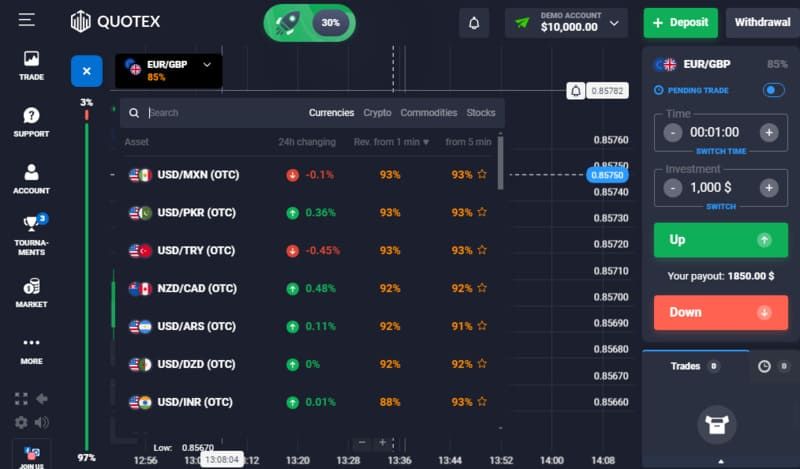
Select an asset from the left panel. You can browse by category (currencies, commodities, crypto, indices) or search by name. Each asset shows the current payout rate. Green dots indicate active markets; red dots indicate closed ones.
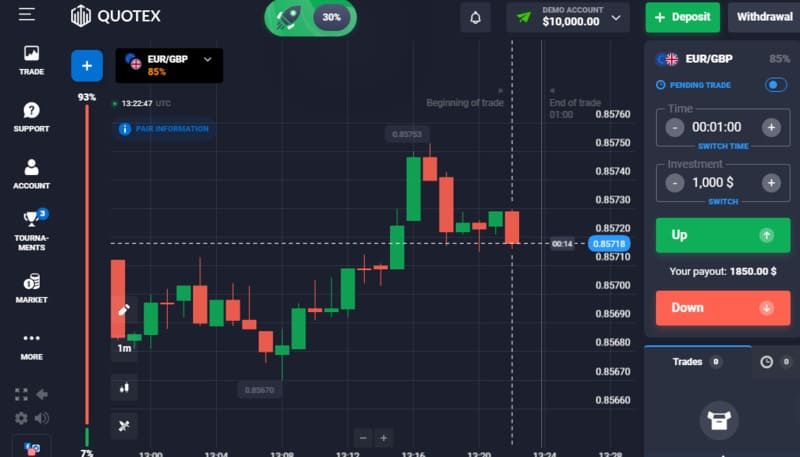
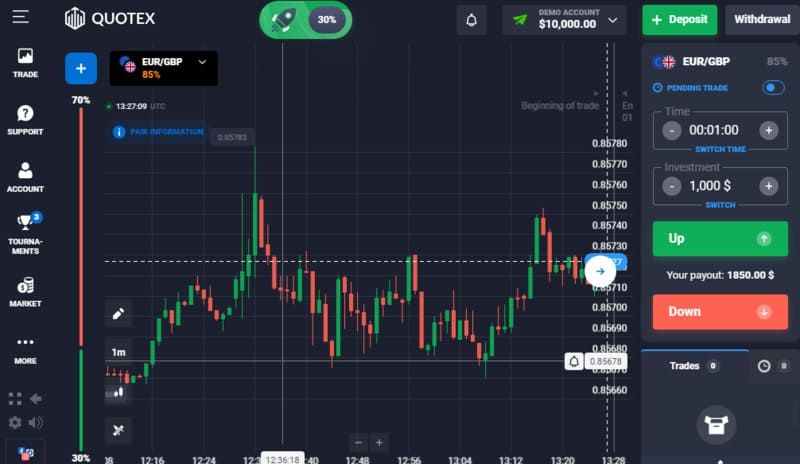
Choose your chart timeframe. Start with 1-minute or 5-minute candles to reduce noise. Short timeframes like 5 seconds show a lot of random movement and are harder to read accurately.
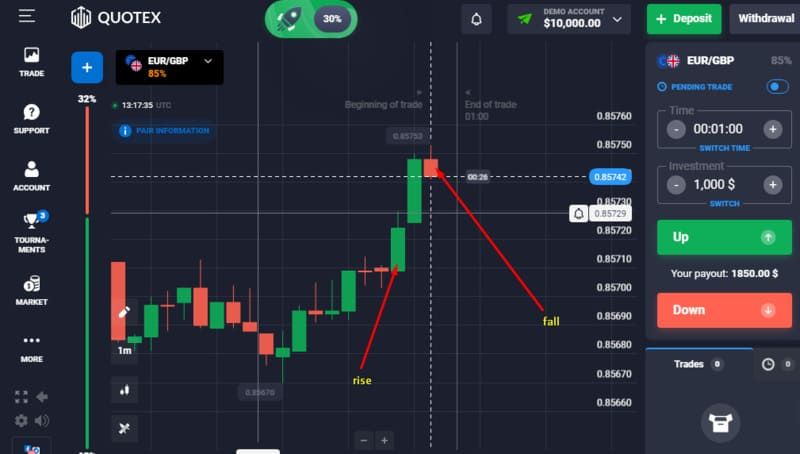
Add indicators. Click the indicators icon on the toolbar. RSI and a simple moving average are a practical starting pair.
Set your trade amount in the right panel. The minimum is $1. Start small even in demo to practice position sizing habits that carry over to a live account.
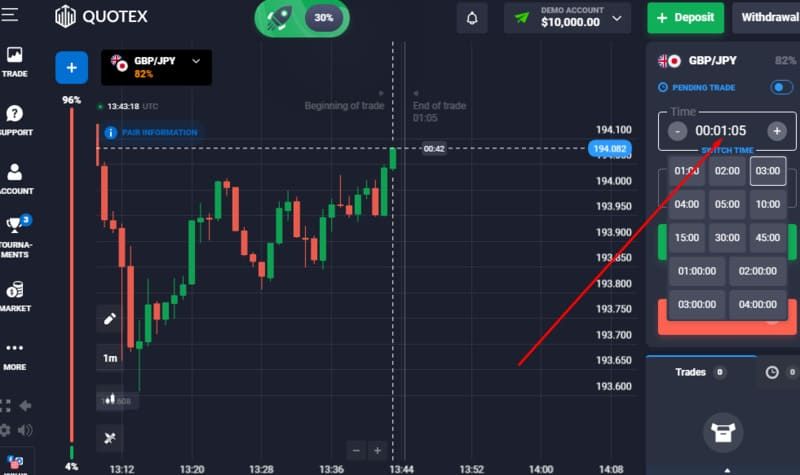
Set the expiry window. Options run from 1 minute to 4 hours.
Click Up (green) if you expect the price to be higher at expiry, or Down (red) if you expect it to be lower.
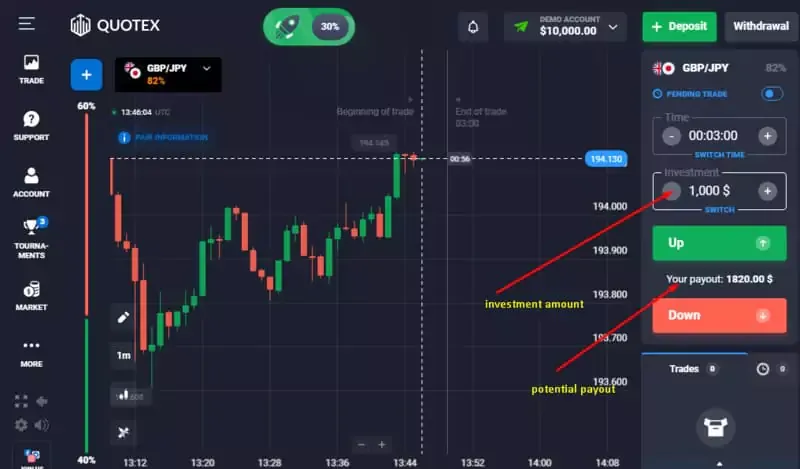
Monitor the trade in the history panel at the bottom. Green means the trade is currently in profit. Red means it is running against your prediction.
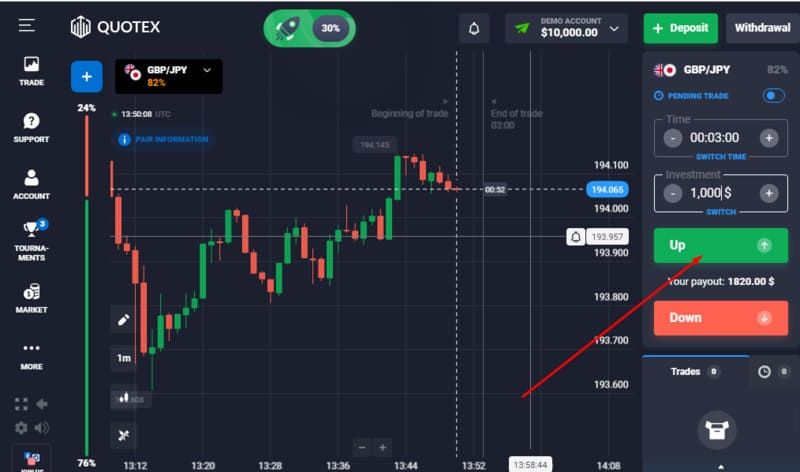
You can monitor how your trade is doing in the trades tab. Green means the trade is going in the direction you predicted, while red means it’s going in the opposite direction.
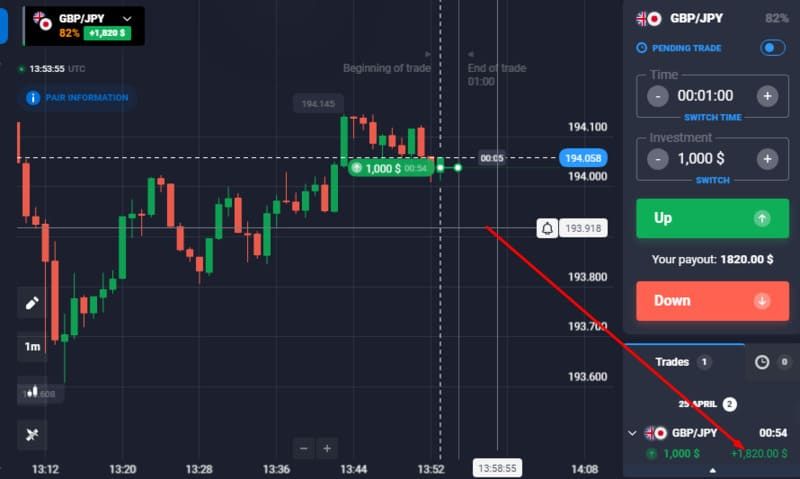
At expiry, a correct prediction pays your stake plus the payout percentage. An incorrect one loses the staked amount.
The demo is the right starting point, but there are things it cannot teach you. Knowing the difference before you switch matters.
The mechanics transfer completely. The same interface, same assets, same indicators, and same payout rates apply to a real account. Nothing about how you analyze a chart or place a trade changes.
What does change is the emotional weight. Losing $20 of virtual money on a bad trade produces no real reaction. Losing $20 of money you deposited and can see leaving your balance produces a completely different feeling. Most traders find their first few weeks of real-money trading expose decision patterns they did not notice in demo: exiting trades early, doubling position size after a loss, overtrading after a win.
The minimum deposit to go live is $10. Starting at the minimum and trading with $1 to $2 per contract initially mirrors the position sizing discipline you should have built during demo practice. For full details on funding methods, processing times, and withdrawal steps, see the Quotex minimum deposit guide.
Once you are trading on a real account and want to access your profits, the withdrawal process is the same path as deposits in reverse. Identity verification (KYC) must be complete before any withdrawal is processed. Upload a government-issued ID and proof of address from the profile section of your account.
| Withdrawal method | Minimum | Processing time | Quotex fee |
| Visa / Mastercard | $10 | 1 to 5 business days | Zero |
| E-wallets (Skrill, Neteller, Perfect Money) | $10 | Same day to 24 hours | Zero (Perfect Money has a small fee) |
| Cryptocurrency (most tokens) | $10 | Under 24 hours | Zero (network gas fees apply) |
| Bitcoin | $50 | Under 24 hours | Zero (network fee applies) |
| Bank wire transfer | $10 | 1 to 5 business days | Zero (bank may charge) |
Note: one source cites a $120 minimum for Bitcoin withdrawals. The platform's own documentation and most current user reports confirm $50 for BTC as of 2026. Verify the current minimum in your account before requesting a crypto withdrawal, as limits can vary by region. Full withdrawal instructions are in the Quotex withdrawal guide.
No. Quotex explicitly allows demo access without any registration. Click the practice or demo button on the homepage, and the terminal opens immediately with $10,000 loaded. You can place trades, switch assets, add indicators, and explore every feature without creating an account.
The only limitation of the no-registration route is persistence. Your trade history, settings, and balance do not save between sessions. Each time you close and reopen the browser, you start fresh. Creating a free account fixes this: your balance, history, and chart settings save automatically to your profile.
Trading on the demo works identically to a real account. Select an asset, set the amount (minimum $1), choose an expiry, and click Up or Down. The candlestick chart updates in real time from live market data. RSI, MACD, Bollinger Bands, and other built-in indicators are available from the toolbar. Zoom in and out on the chart to read shorter or longer patterns. Trade history appears at the bottom of the screen as each contract closes.
The platform, assets, indicators, and payout rates are identical. The differences are structural and psychological.
| Demo account | Real account | |
| Balance | $10,000 virtual, reset any time | Starts from your deposit ($10 min) |
| Assets | Full list (410+ instruments) | Same full list |
| Indicators | 30+ built in | Same |
| Payout rate | Up to 98% | Up to 98% |
| Trade minimum | $1 | $1 |
| Trade maximum | $1,000 | $1,000 |
| OTC assets (weekends) | Yes | Yes |
| Withdrawal | Not available | Available from $10 |
| KYC required | No | Yes, before withdrawal |
| Emotional pressure | None | Present from first trade |
| Copy trading / tournaments | Not available | Available |
The performance gap between demo and live is almost always emotional rather than technical. The platform conditions are the same. What changes is how you respond to a losing streak, whether you stick to your rules under pressure, and whether you manage position size consistently. Demo builds the mechanical skill. Live trading tests whether that skill holds when money is on the line.
The balance resets are unlimited and instant. There is no waiting period, no form, and no limit on how many times you can do it.
If your balance is below $10,000:
If your balance is above $10,000:
The top-up option does not appear. You need to bring the balance below $10,000 first by placing trades, then use the reset option.
On mobile:
The same option is available under the balance menu in the app. The process is identical to the web version.
One practical note: most traders who blow through $10,000 of virtual funds in a day are trading with no position sizing discipline, often placing $500 to $1,000 trades on a $10,000 balance. That is a 5 to 10 percent of capital per trade, which no professional would do. When you reset, try limiting each trade to 1 to 2 percent of the balance ($100 to $200 maximum) to build habits that actually transfer to a real account.
The demo account is available on every platform Quotex supports.
| Platform | How to access | Notes |
| Web browser (PC / Mac) | Go to qxbroker.com - no download needed | Works on Chrome, Firefox, Safari, Edge |
| Windows desktop app | Download from qxbroker.com | Slightly faster than browser for some users |
| Android app | Download from Google Play Store | Full interface, same features as web |
| iOS app | Download from the App Store | Full interface, same $10,000 demo balance |
To access the demo on mobile:
Your trade history and settings sync across all platforms when you are logged into your account. If you switch from PC to mobile mid-session, your chart layouts will not carry over (those are device-specific), but your balance and trade history will be current on both.
The mobile app performs consistently with the web version. The main layout difference is that the navigation icons move from the left-side panel on desktop to a bottom bar on mobile, which suits thumb navigation on smaller screens.
The Quotex demo account does what a demo account should do. The pricing is live, the features are complete, and there is no time pressure to switch to a real account. The $10,000 balance with unlimited resets gives you room to test strategies across different assets and timeframes without rushing.
What it cannot replicate is the experience of trading with money that is actually yours. That gap is real and it affects every trader differently. The most useful approach is to treat the demo seriously: use realistic position sizes relative to the balance, keep a record of trades and outcomes, and set a target hit rate before switching to live. If a strategy is not working consistently in demo, it will not work under real-money pressure either.
When you are ready to go live, the minimum deposit is $10. For promo codes that can stretch that starting balance, check the Quotex promo codes page before depositing. The FAQ below covers the most common questions about the demo in brief.
The Quotex demo account is a practice account funded with $10,000 in virtual money. It gives you access to the full Quotex trading platform, including all assets, indicators, and chart tools, without requiring a deposit. Prices are pulled from live market feeds, so what you practice reflects real market conditions. The demo is free, has no expiry date, and the balance can be reset unlimited times.
The demo works the same way it has since launch, with no structural changes in 2026. You access it without registration from the Quotex homepage, or through a free account to save your history. You get $10,000 in virtual funds, full asset access across 400+ instruments, and the same 30+ indicators available on a real account. Payout rates in the demo are identical to live rates, up to 98%. You place trades by selecting an asset, setting an amount and expiry, and clicking Up or Down. The balance resets to $10,000 on demand, unlimited times.
Operationally, Quotex processes withdrawals consistently and has been active since 2019 with over 40 million registered users as of 2026. The platform uses SSL encryption and supports two-factor authentication. The significant caveat is regulatory: Quotex holds no license from a tier-one authority (FCA, CySEC, ASIC, SEBI). It operates under the Seychelles FSA, which is a low-tier regulator. This means no formal investor protection if a dispute arises. The risk is regulatory, not operational. See the Quotex countries list for jurisdiction-specific access information.
Go to qxbroker.com and click the demo or practice button. No registration is required. A $10,000 virtual balance loads immediately. To save your progress between sessions, create a free account with just an email and password, no deposit needed. Once in the terminal, select an asset, set your trade amount (minimum $1), choose an expiry time, and click Up or Down. For a full step-by-step breakdown of strategy testing on the platform, see the Quotex trading strategy guide.
Yes, and specifically because it requires no deposit to start and no time pressure to switch to a live account. Beginners can spend as long as they need learning to read candlestick charts, understand how indicators like RSI and MACD behave in real market conditions, and practice decision-making without financial risk. The main thing to avoid is treating it as consequence-free clicking: use realistic position sizes and keep a record of trades. Habits built in demo carry over to live trading, both the good ones and the bad ones.
Discover top binary options brokers tailored to your region. Browse our curated lists by country:
All Brokers | Top Brokers | USA | Canada | UK | Australia | Nigeria | India | New Zealand | Germany | Turkey | Spain | France | Ukraine | China | Indonesia | Pakistan | Bangladesh | Russia | Mexico | Japan | Brazil | Philippines | Vietnam | Iran | South Africa | Italy | South Korea | Argentina
Find Your Perfect Broker: Explore Our List Now!
Choose the best with our expert-selected options


Find Your Perfect Broker: Explore Our List Now!
Choose the best with our expert-selected options
Discover top binary options brokers tailored to your region. Browse our curated lists by country:
13661