Updated:October 15, 2026

10 min
10 min

In this article, I'll explain how to trade on Expert Option, going through each step from the sign-up process to how you deposit, trade, and withdraw your earnings. Keep reading to learn everything you need to know about using Expert Option.

Author

I created an account with Expert Option a couple of months ago, and it was pretty easy to do. You only have to fill out the fields for email and password and prove your identity. Do not share your password with anyone else.
However, you must check the legality of the platform in your country prior to signing up. While Expert Option is legal in most countries, it does not serve the United States, the Member States of the European Union, Sudan, the UK, Singapore, Switzerland, Israel, Canada, and Yemen. Users from there are advised it's crucial for beginners to exit the platform and wait until the rules governing them provide further direction for their return.
Now, if Expert Option is valid in your region, there are no other rules, and it's simple to sign up. Here's what you do:
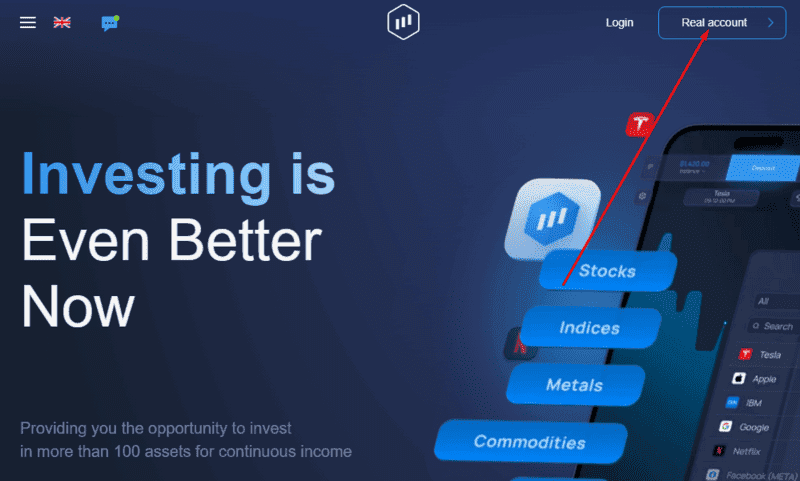
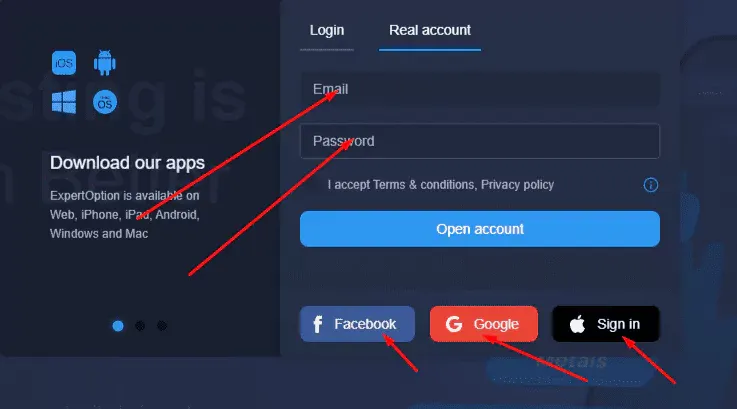
If you're still deciding whether Expert Option is worth signing up for, the country-restriction list above matters more than most guides admit: check yours before you fill out anything, since account closures for restricted regions aren't reversible with a support ticket. This how to trade on expert option for beginners walkthrough continues once you've confirmed you're eligible – the platform is also fully usable through the same steps on expert option mobile trading if you'd rather sign up from a phone than a desktop browser. If you'd rather test the waters before entering any payment details, the Expert Option demo account covered further down needs nothing beyond the sign-up step above.
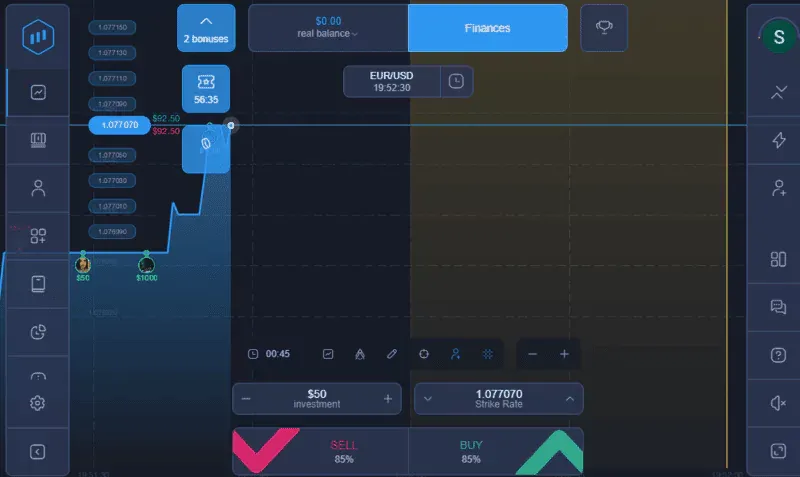
Before you fund anything, get familiar with account security. ExpertOption lets you stay logged in across multiple devices, which is convenient if you're checking a chart from your phone while trading from a desktop, but it also means a device you forgot to log out of stays accessible to whoever picks it up next.
Check "Active Sessions" under Settings periodically. It lists every device currently signed into your account, and you can end any session you don't recognize or no longer use directly from that screen.
ExpertOption requires standard KYC verification: a government ID and proof of address, and in some regions a confirmed phone number. Withdrawals specifically are gated behind this step, so submitting clear, current documents early saves a delay later when you actually want to cash out.
Every new account comes with a demo balance of $10,000 in virtual funds, credited automatically at sign-up. The interface is identical to the real-money version, down to the same charts and order flow, so time spent here transfers directly once you switch to trading with actual capital.
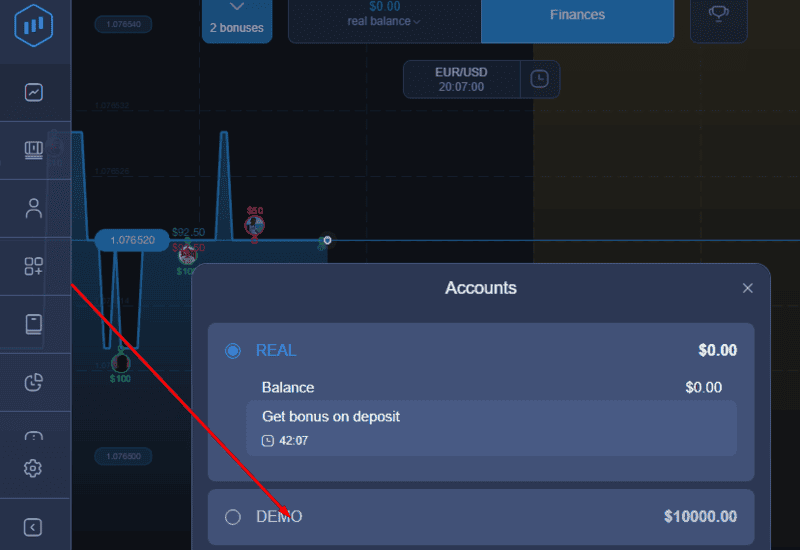
Switching is simple: open the account tab showing "Real Balance" on the dashboard and select Demo from the dropdown. Switch back the same way when you're ready to trade live.
Payment methods vary by region, and some countries apply stricter KYC requirements before a first deposit clears. Here's what's generally available:
| Method | Examples | Notes |
| E-wallets | Perfect Money, Skrill, Neteller, Fasapay | Widely available, fast processing |
| Debit/credit cards | Visa, Mastercard, UnionPay, Maestro | Accepted across most regions |
| Online banking | Regional bank partnerships | Availability depends on your country |
| Cryptocurrency | Bitcoin, Ethereum, and others | Requires blockchain confirmation before funds show |
| Mobile money | Paytm, M-Pesa, and similar local processors | Available in specific regions only |
The minimum deposit is $10, though you can open an individual trade for as little as $1. ExpertOption also runs a 100% first-deposit bonus for deposits of $30 or more. The platform itself charges nothing for deposits or withdrawals, though your bank or payment provider might apply its own fee on their end.
To deposit: open Finances from the dashboard, select Deposit, and choose a method. Your first deposit will prompt you for the KYC documents mentioned above if you haven't submitted them yet; after that, funding your account is a single click on your saved method.
If you searched specifically for how to trade in expert option rather than the account setup above, this is the section you want. Once your account is funded, or you're testing on demo, placing a trade follows the same steps either way:
If you've never placed a trade on any platform before, our complete guide covers the underlying mechanics in more depth than fits here.
Withdrawals route through the same partners as deposits, so processing time depends on the method. Crypto withdrawals are usually near-instant once the blockchain confirms the transaction; a direct bank transfer typically takes longer, sometimes several business days depending on your bank.
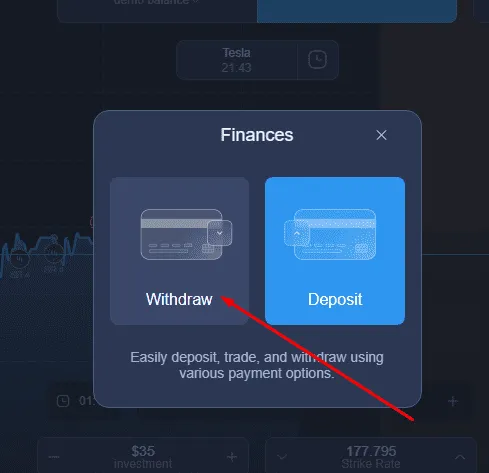
To withdraw: open Finances, select Withdraw, and choose your method. If your account hasn't finished KYC verification yet, expect the request to sit in review until it does – ExpertOption confirms identity before releasing funds even to accounts that were allowed to deposit and trade without it.
Expert Option offers various tradable assets like stocks and other assets in other markets. Here's what you can trade on the platform, even with one trade:
This list covers the core expert option trading categories – ExpertOption periodically adds or drops specific instruments within each one, so treat it as the general shape of what's available rather than a fixed catalogue.
If you want the current flow without the full backstory above: sign up with email, Google, Facebook, or Apple, then select Real Account or stay on Demo. Verify your identity with an ID document and proof of address before your first withdrawal – ExpertOption asks for this eventually regardless of when you deposit, so submitting it early avoids a delay later. Fund the account through Finances, then Deposit, picking whichever method from the table above suits you. Open a chart, pick an asset, set an investment amount, and choose Buy or Sell based on where you think the price is heading before the timer runs out.
The screens themselves get minor visual refreshes periodically, so a button's exact position may shift slightly from year to year, but this sequence – sign up, verify, fund, trade – hasn't changed structurally.
A few issues come up repeatedly. Verification stalling is usually a photo quality problem: blurry ID scans or an outdated proof-of-address document both get rejected automatically, so resubmitting a sharper, more recent document clears most holds.
A deposit that hasn't appeared is almost always a processing-time issue rather than a lost payment – crypto needs blockchain confirmations first, and bank transfers can take a business day or more depending on the sending bank.
A withdrawal stuck in review typically means the account hasn't finished KYC, since ExpertOption verifies identity before releasing funds even if it let you deposit and trade without it first. If the demo balance runs out, it resets rather than staying at zero – log out and back in, or check account settings for a reset option.
One more thing worth clarifying if you landed here after searching how to trade in pocket option: Expert Option and Pocket Option are separate, unrelated brokers. If Pocket Option is what you actually meant, our Pocket Option login guide is the right starting point instead.
A few habits separate people who stay profitable from people who blow up an account fast. Trade smaller than feels natural at first – sizing every position as if it's the only trade of the day protects you from a losing streak wiping out weeks of gains in an afternoon.
Set a personal stop point before you open a position; deciding your exit after a trade starts losing almost always means deciding it too late. Keep a simple log of each trade and why you took it. Patterns in your own decisions show up faster on paper than in memory.
Treat the demo account as a testing ground for one specific idea at a time. Move to real money once a strategy has held up across a genuine range of market conditions, across several weeks rather than one lucky run.
ExpertOption is one of the most dominant options trading platforms. While it has received mixed reviews in its lifetime, it's still a great place to start trading and managing various assets, especially for beginners. It has a simple UI for easier trades, provides demo trading, technical analysis, plus strategies to manage risk in the financial markets, and doesn't charge transaction fees.
Initiating your first trade with ExpertOption is easy now that you have all the right guidance to invest and trade your funds to turn a profit and learn how to avoid losses while sharing lessons with others. Happy trading with calculated risk and investing in the financial markets!
That covers the mechanics end to end, from funding an account to withdrawing from it. If you're still asking what is Expert Option, or wondering is Expert Option legit given the mixed reviews above, both get a straight answer in the FAQ below, along with the questions readers ask most.
What is how to trade on expert option?
It's the full process covered in this guide: creating an account, verifying your identity, funding it, and placing a trade – from opening a chart to choosing Buy or Sell before a set timer runs out.
How does how to trade on expert option work in 2026?
The steps themselves are unchanged: sign up, verify, deposit, trade. What's shifted is mostly around verification – expect KYC checks to be enforced more consistently before a first withdrawal than they were in earlier years.
Is Expert Option safe and legit?
It's a real, operating platform with a long track record, not a front for fraud. That said, reviews of it are genuinely mixed, and it isn't available in several major markets, including the US, UK, Canada, and the EU. Treat it with the same caution you'd apply to any offshore broker.
How do I get started with how to trade on expert option?
Confirm your country isn't on the restricted list, then sign up with email or a linked account, complete verification early, and practice on the $10,000 demo balance before funding a real account.
Is it good for beginners?
Yes, mainly because of the demo account and the low $1 minimum trade size, which together let you learn the mechanics without meaningful financial risk. The mixed reviews mentioned above are worth reading before depositing real money, though, not just the walkthrough itself.
Find Your Perfect Broker: Explore Our List Now!
Choose the best with our expert-selected options


Find Your Perfect Broker: Explore Our List Now!
Choose the best with our expert-selected options
Discover top binary options brokers tailored to your region. Browse our curated lists by country:
7355