Updated:November 18, 2026

11 min

0
Comparing the best forex trading apps: MT4, MT5 and broker apps
A good forex trading app should let you do three things well: watch price clearly, place orders without friction and manage risk without hunting through menus. Everything else comes after that.

Vishenko Dmitry
Author

Updated November 18, 2026
The best forex trading apps make order management straightforward, even during a busy session. You should be able to review a position and adjust its stop without hunting through menus. Everything else comes after that.
What to look for in a forex trading app
The best forex trading app is not necessarily the one with the most indicators. Most traders need clean charting, stable order entry, stop-loss and take-profit controls, price alerts and a demo account. On top of that, the app should make it easy to check spreads, commissions and account information without digging around.
Start with the order ticket. It should show the instrument, trading volume and estimated required margin in a way you can interpret before placing the trade. Access to stop-loss and take-profit levels should be obvious. If the interface makes it easy to open a position but awkward to reduce it, the design is encouraging a risky habit. During a fast market, a clean close-position control is more valuable than another decorative indicator.
The next test is account information. A trader should be able to locate equity, free margin and open profit or loss within a few seconds. An app that displays balance prominently but buries equity can cause serious misunderstandings when leveraged positions are active. The account's margin-call and stop-out rules still belong to the broker, not the app developer. Read the broker contract while judging the interface.
Security is part of the product. Look for biometric device access where available, official two-factor protection and clear instructions for signing out of a lost phone. A fake app can imitate most of the visible charting interface. Use official publisher links rather than third-party download pages. If your broker offers its own mobile app, compare the publisher and website address with the brand's help center before entering credentials.
MetaTrader 4 and MetaTrader 5 mobile apps
MT4 and MT5 still matter because they remain the default language of retail forex in many regions. MT4 is familiar and light. MT5 is broader and more modern. Many traders who say they want the best app for forex trading really mean they want a broker that supports MT5 well on mobile.
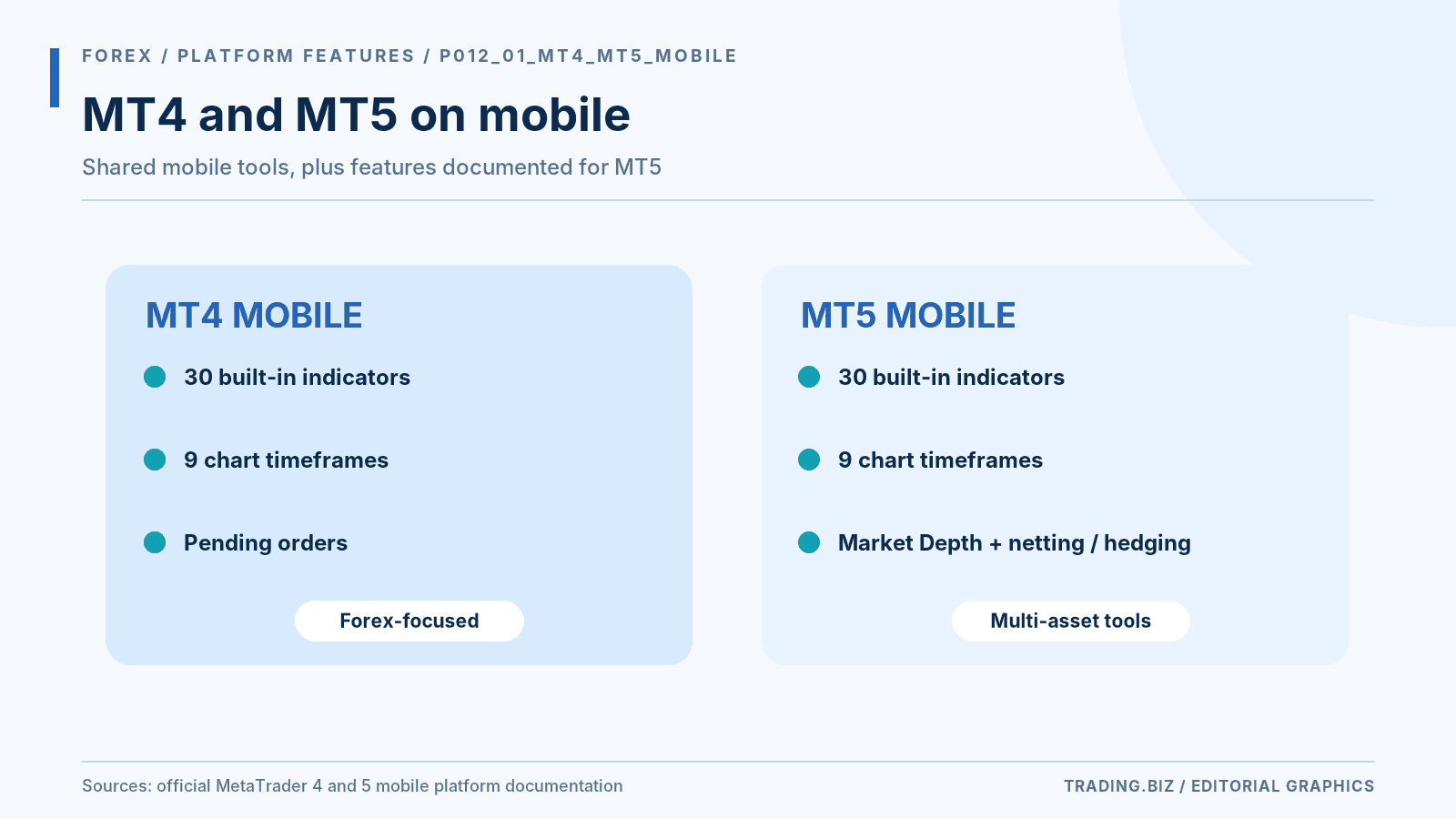
Figure 1. Officially documented mobile features of MT4 and MT5.
MetaTrader 4 has a familiar interface built around retail forex conventions. MetaTrader 5 supports a broader set of market structures and order functions, but whether those products are available depends on the connected broker. An MT5 installation is not an account. The broker must provide a trade server and login credentials. The same username may work for a broker portal while failing on an MT5 trading server because those systems authenticate differently.
On mobile, the two apps share much of the basic workflow: open a chart, choose an instrument, place a trade and monitor exposure. More advanced algorithmic features usually live on desktop. An expert advisor running on a home PC does not begin operating inside the mobile app simply because the trader logged in on a phone. If automated trading is central to your method, you may need a desktop terminal or hosted environment while the phone serves as a monitoring tool.
A practical MT5 mobile test
Open a demo instrument and check its contract details. Find the minimum lot size and the number of decimal places used in quotes. Place a small pending order away from the current market, add a stop and then change the order's price before canceling it. You will learn more about the app's reliability from that sequence than from scrolling through the indicator menu. Repeat on cellular data to see whether network changes affect the connection.
Broker proprietary forex trading apps compared
Broker apps can be better than generic platform apps if the broker invested in mobile design. The advantage is tighter integration with deposits, verification, account management and support. The drawback is that charting depth and advanced tools may be lighter than what platform-first traders want.
A broker app can combine trading with funding and support in one interface. That makes account management easier. The drawback is that it may lack specialist charting or order features that the trader already uses on a third-party terminal. If you plan to move between brokers, using a familiar platform such as MT5 can reduce relearning. But the execution quality and costs still depend on the broker connected to it.
TradingView integration is another separate question. A broker can supply price charts that resemble TradingView without offering full account trading through TradingView's broker panel. Check whether orders are routed from the chart and which account types are supported. If the chart merely displays prices and the order must be submitted elsewhere, it is a research tool rather than an integrated trade terminal.
Charting, order types and alerts in a forex trading app
Charting should be readable without clutter. Order types should cover market, limit and stop orders cleanly. Alerts matter more than traders think because a mobile workflow often depends on quick check-ins rather than constant screen time.
A serious charting test uses the same timeframe and indicator settings on two devices. Compare candle times, session boundaries and the way overnight gaps appear. Price feeds may differ slightly because forex is an over-the-counter market rather than one centralized exchange. A difference in a chart is not automatically manipulation. The important question is whether your broker's execution prices and platform records are consistent with its published pricing model.
Order types deserve hands-on testing. A limit order defines the most unfavorable acceptable price, although it may not fill. A market order prioritizes execution and can experience slippage. A stop order may activate at the trigger and fill at a different price, especially around news. The app should make these distinctions clear. A well-designed alert should also tell you whether it is based on bid, ask or another reference price.
Alerts do not eliminate latency
A price alert can arrive after the market has moved. Push notifications depend on the phone's connection and operating system. Do not use an alert as the only control protecting a leveraged account. Where appropriate, protective orders should reside on the broker's system. Even then, a stop-loss order is not a guarantee of a particular fill during gaps or market disruption.
Demo accounts, spreads and commissions
A demo account is the easiest way to check whether an app fits your workflow. Cost transparency matters too. If the app makes spreads, commissions or swap charges hard to find, that is not a good sign. A strong forex app should make the trading cost visible before you place the order.
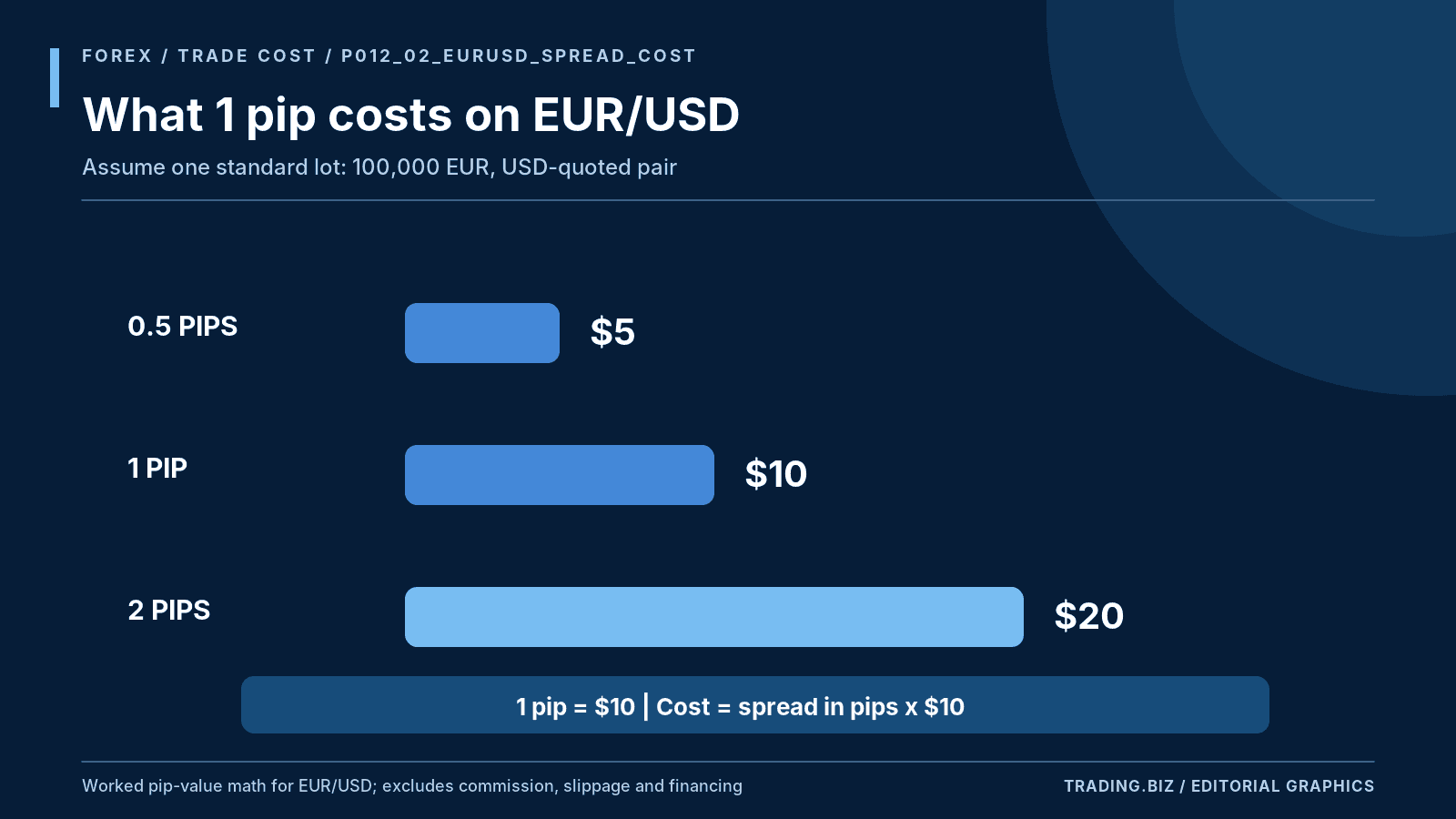
Figure 2. EUR/USD spread costs at a standard lot size.
The word "zero spread" is rarely enough to evaluate total trading cost. Some accounts substitute a commission, while others show a low average spread that widens during volatile periods. For EUR/USD, a standard 100,000-unit lot has approximately $10 of pip value when the quote currency is USD. A one-pip spread therefore represents about $10 of gross transaction cost at that size. At 0.10 lot, the same pip costs about $1. Add commissions and any slippage to compare the round trip realistically.
Test costs during the hours you trade. The Asian session can differ from the London-New York overlap. Major economic news can widen spreads sharply even at a reputable broker. Take screenshots of quoted bid and ask prices on several normal days, across several market conditions. For swing positions, check swap or financing charges as well as the entry spread.
A useful comparison log records the quoted EUR/USD spread at the same clock time on three ordinary days, then notes the commission applied to the demo's corresponding account type. Demo execution may be more favorable than live fills, so these observations are a screening exercise rather than a performance guarantee. Look for consistent disclosure, sensible contract specifications and a broker that explains how slippage is handled. An attractive interface cannot compensate for an account whose trading costs undermine the strategy.
The best forex trading app by experience level
Beginners usually do well with a clean app, a solid demo and limited clutter. Experienced traders care more about order speed, alerting and whether the mobile app stays usable when the market gets busy. There is no single perfect app, but the best forex trading apps all make risk management easy to access.
A beginner benefits from a calm interface and a free demo account, but should also learn how notional exposure works. A $100 balance does not make a leveraged $10,000 position low risk. The app should allow the user to review margin and position size before confirming an order. A tutorial that skips those details in favor of potential profits is incomplete.
More experienced traders may value custom layouts and reliable order modification over ease of first registration. Scalpers often need fast access to open positions, while position traders care about alerts and overnight account reports. Try at least two platforms with the same test routine. Pick the one that makes the high-risk actions harder to do accidentally and the ordinary tasks easier to do correctly.
A five-minute security check
Verify the app publisher and website, enable available two-factor authentication, and make sure the login notification email is under your control. Then check the account's withdrawal-address controls if applicable. A stolen password can create a larger loss than a slightly wider spread. Treat account security as part of the cost of using any trading app.
How traders use a forex trading app day to day
In real life, most traders do not do every part of the job on a phone. Many use mobile for monitoring, alerts, trade management and quick entries, while doing deeper chart review on a larger screen. That is why a strong mobile app should make the core tasks easy instead of trying to mimic a desktop platform in every detail.
The best apps keep the basics front and center: instrument search, chart access, order ticket, active positions and account metrics. If those screens are clean, the app usually feels solid even before you test advanced tools.
A practical way to compare forex apps
Open a demo on two or three apps and perform the same simple workflow on each one. Search for a pair, open a chart, place a stop order, add an alert and modify a trade. The app that lets you do that without friction usually wins the usability test.
Then compare the cost side. The slickest app in the world is still a poor choice if the broker’s spreads, commissions or swap costs do not suit your trading style.
Mistakes traders make with forex trading apps
The first mistake is picking an app because it looks sleek without checking whether the broker behind it is competitive on trading costs. The second is skipping the demo and assuming all apps feel the same. They do not. Chart flow, order tickets and alert logic vary more than people expect.
The third mistake is trying to do every part of trading on a phone. Mobile is powerful, but it works best as part of a wider routine. Most traders perform better when the app is used for monitoring and execution while deeper review happens on a larger screen.
FAQ
What is the best forex trading app for beginners?
One with a simple interface, a strong demo account and easy risk controls usually works best for beginners.
Is MT4 or MT5 better on mobile?
MT5 is more modern and broader, while MT4 still feels familiar to many traders. The better choice depends on the broker and your workflow.
Should I use a broker app or MetaTrader?
If you want integration and convenience, a broker app can be great. If you want platform familiarity, MetaTrader often wins.
Do forex trading apps show spreads and commissions clearly?
Good ones do. If cost information is buried, that is a warning sign.
Can I trade only from my phone?
Yes, many traders can manage from mobile, though detailed analysis is often easier on a larger screen.
Find Your Perfect Broker: Explore Our List Now!
Choose the best with our expert-selected options
Find Your Perfect Broker: Explore Our List Now!
Choose the best with our expert-selected options
Discover top binary options brokers tailored to your region. Browse our curated lists by country: